Preface
The purpose of this book is simple: to help you build a systematic understanding of TiKV. That means building a mental model of its major components, the mechanisms behind them, and how they fit together.
TiKV is a large system with more than 550,000 lines of Rust. Without the big picture, it is easy to get lost in the code. This book tries to give you that map first.
The book prioritizes human understanding. The text has been kept as concise as possible to make it digestible for humans. The chapters start with the most accessible ideas and gradually build toward concepts that require more background. Think of it as climbing a mountain, one level at a time. Don't be daunted by its height. This book will guide you every step of the way.
The Level Map shows the path ahead and how the ideas build on one another. That is where the journey begins.
Scope
This is not official TiKV documentation. For official information, see the TiKV website and TiKV repository.
This book represents the author's view and focuses on the core ideas rather than every part of TiKV. It is a work in progress and will continue to evolve.
FAQ
Who is this book for?
Anyone interested in understanding how TiKV works.
Why bother with human understanding when coding agents can write code and solve issues on their own?
Humans are not completely out of the software development cycle - yet.
As coding agents become more capable, understanding every detail of a particular piece of code may matter less and less. But mental models matter more.
With the right model, you know how the system is expected to behave, where to look when something goes wrong, and how to extend, debug, or build upon it - much like working from a specification. It also helps you work better with AI: you can ask better questions to get better answers.
And when the day comes that coding agents completely take over, understanding the code will become a human hobby.
Why not just read the TiKV code directly?
You should. No learning material, including this book, can replace reading the code.
But TiKV is a large repository, and reading it without a map can be difficult. AI makes code exploration much easier, but the experience can still feel fragmented and too detail-oriented.
This book provides the big picture and a step-by-step roadmap. Once you have the mental model, you can return to the code and use AI to fill in the details.
Was this book AI-generated?
I hoped a prompt like Give me a book about TiKV would be enough, but it simply wasn't.
I tried tweaking prompts and skills and letting AI generate the text end to end. But more often than not, the result didn't feel natural or easy to digest. Maybe that's because I already have the mental model in my head and am very opinionated about how to present it. My goal is to maximize understanding for human readers.
Common issues in AI-generated drafts include:
- bringing up concepts without a proper introduction;
- listing implementation facts without giving intuition or the big picture;
- having a low signal-to-noise ratio, burying key insights in unnecessary text.
So the typical workflow is this: I throw in some keywords and concepts, and AI generates a draft. I read it and find myself very unhappy. After four or five rounds of prompting, I give up on the draft, but at least I get a refresh of the relevant concepts. I then write the outline and sentence skeletons myself, verify the ideas against the code when needed, and ask an agent to get the grammar right or fill in the language. I then review and edit the result sentence by sentence.
Level Map
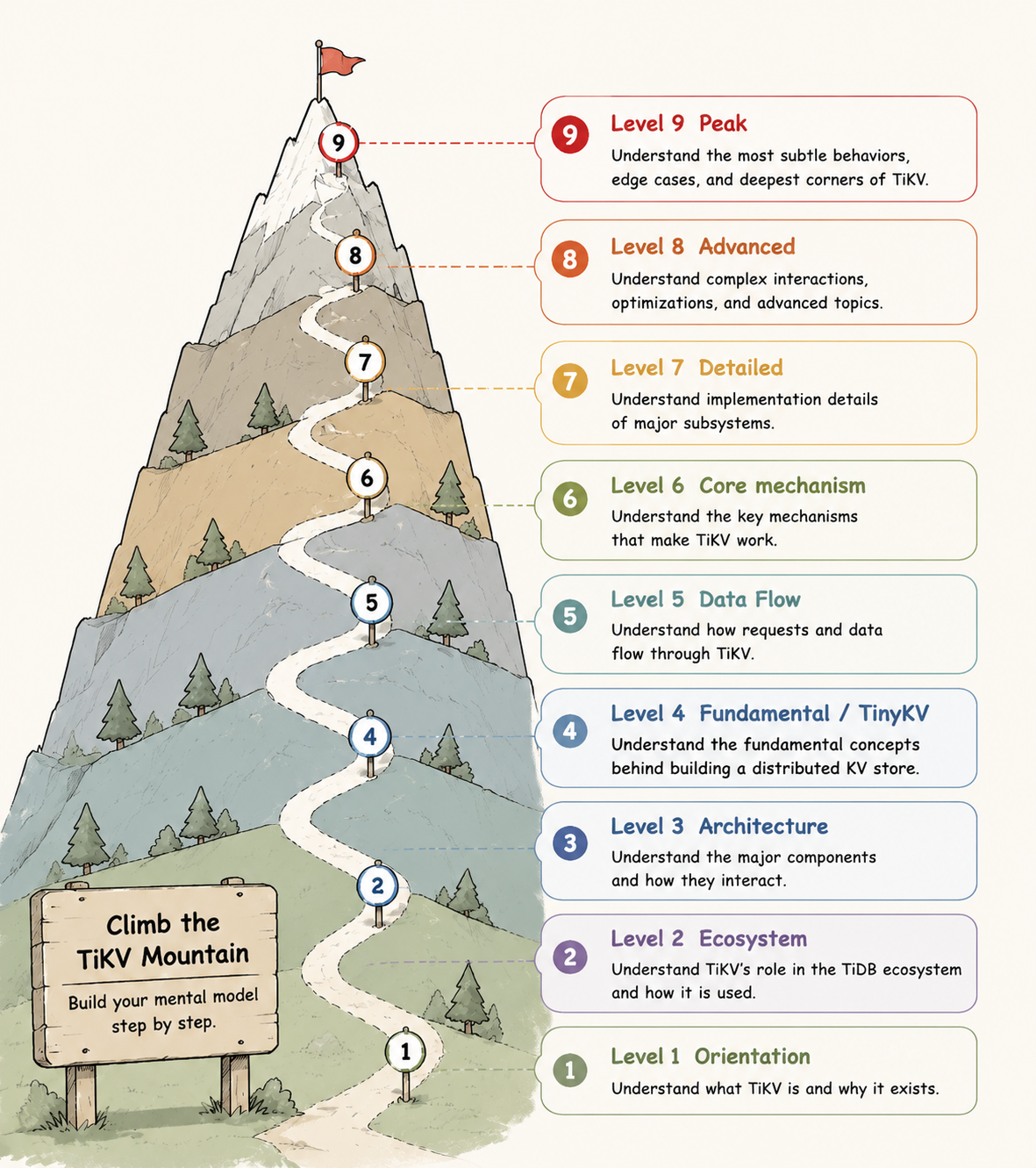
| Level | Topics |
|---|---|
| Level 1 (Orientation) | TiKV101 What Is TiKV? |
| Level 2 (Ecosystem) | TiKV201 TiDB Ecosystem |
| Level 3 (Architecture) | TiKV301 Architecture |
| Level 4 (Fundamental) | RAFT401 Raft Crash CourseRAFTSTORE402 Raft Event LoopROCKSDB403 RocksDB IntroTXN404 Transaction Intro |
| Level 5 (Data Flow) | RAFTSTORE501 Write Flow 502 Linearizable ReadsCOP503 Coprocessor Intro |
| Level 6 (Core Mechanism) | RAFT601 Leader Transfer 602 Replica Movement 603 Raft SnapshotRAFTSTORE604 Region SplitROCKSDB605 RocksDB LSM TreeCOP606 Coprocessor PatternsTXN607 Transaction Scheduler |
| Level 7 (Detailed) | RAFTSTORE701 Batch System 702 Slow Score 703 Region WorkerROCKSDB704 RocksDB Details 705 TitanCOP706 YATP Read Pool 707 Coprocessor ExecutionTXN708 Async Commit and 1PC |
| Level 8 (Advanced) | RAFTSTORE801 Region Merge 802 Raft HibernationTXN803 In-Memory Pessimistic LocksROCKSDB804 GC and Compaction Filter |
| Level 9 (Peak) | RAFTSTORE901 Peer Lifecycle and Crash Recovery |
TiKV 101: What Is TiKV?
TiKV is the storage layer of TiDB, a distributed SQL database.
A database stores and manages data. Almost every online service, from shopping websites to banking systems, depends on databases to keep track of information.
A distributed database spreads data across multiple machines so the system can grow beyond a single machine, handle higher traffic, and keep working through machine failures.
TiDB is one such distributed database. TiKV is the storage layer inside TiDB: the component responsible for storing and retrieving data.
At its core, TiKV is a highly scalable, low-latency key-value store. A key-value store organizes data as pairs: given a key, the system stores or retrieves the corresponding value.
key                 value
-----------------   -----
user:42:name        Alice
user:42:city        Shanghai
order:9001:status   paid
Real TiKV is much more complex than this, but this key-value model is the first mental model to keep in mind.
Low latency means TiKV is designed to serve reads and writes quickly. Another important part of TiKV is transaction support: when one logical operation touches multiple pieces of data, those changes must be applied correctly together.
These properties are essential for OLTP (Online Transaction Processing) workloads, which power user-facing applications such as creating an order, updating an account balance, or changing a user profile. These operations are usually small, but they require both low latency and strong correctness.
This combination is what makes TiKV interesting. It is not just a place to store data. It is a distributed system designed to remain fast and reliable as data grows, traffic increases, and failures become inevitable.
TiKV 201: The TiDB Ecosystem
A basic TiDB cluster has three main components: TiDB, TiKV, and PD (Placement Driver).
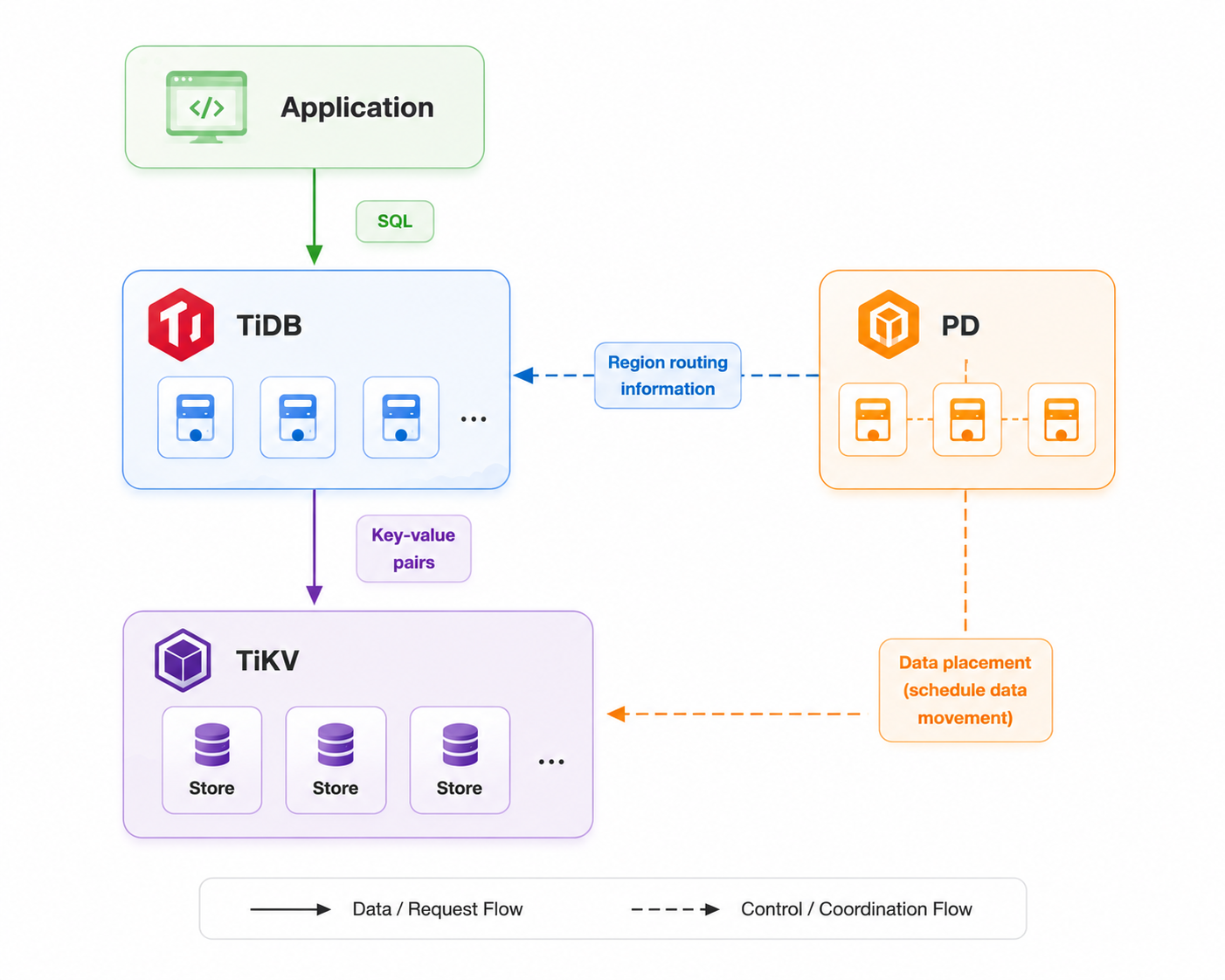
- TiDB is the compute layer. It accepts SQL requests from applications, processes queries, and translates them into key-value requests sent to TiKV.
- TiKV is the storage layer that stores key-value pairs.
- PD manages cluster metadata and coordinates data placement. It decides where data should be stored and schedules data movement between TiKV nodes.
TiKV runs as a cluster of nodes. Each node is a separate process called a store, typically running on a different machine or container.
Regions
To split data among stores, TiKV divides the entire keyspace into smaller ranges. Each range is called a Region.
A Region is identified by a start key and an end key. It contains all keys within that range.
For example:
Region 1: [a, h)
Region 2: [h, t)
Region 3: [t, z)
A key belongs to exactly one Region based on its range:
cart:1           -> Region 1
order:9001       -> Region 2
user:42:name     -> Region 3
A Region is the basic unit TiKV uses to distribute and manage data. PD can guide Regions to move between stores to keep the cluster balanced. A Region typically contains less than 256 MiB of data. When a Region grows too large, TiKV can split it into smaller Regions; when neighboring Regions become small, TiKV can merge them into one Region.
Replicas
A Region can have multiple copies stored on different TiKV stores. Each copy is called a replica.
A Region's replicas are managed by Raft. Among these replicas, one is elected as the leader. The leader handles read and write requests for the Region, while other replicas follow the leader and replicate its data.
For example:
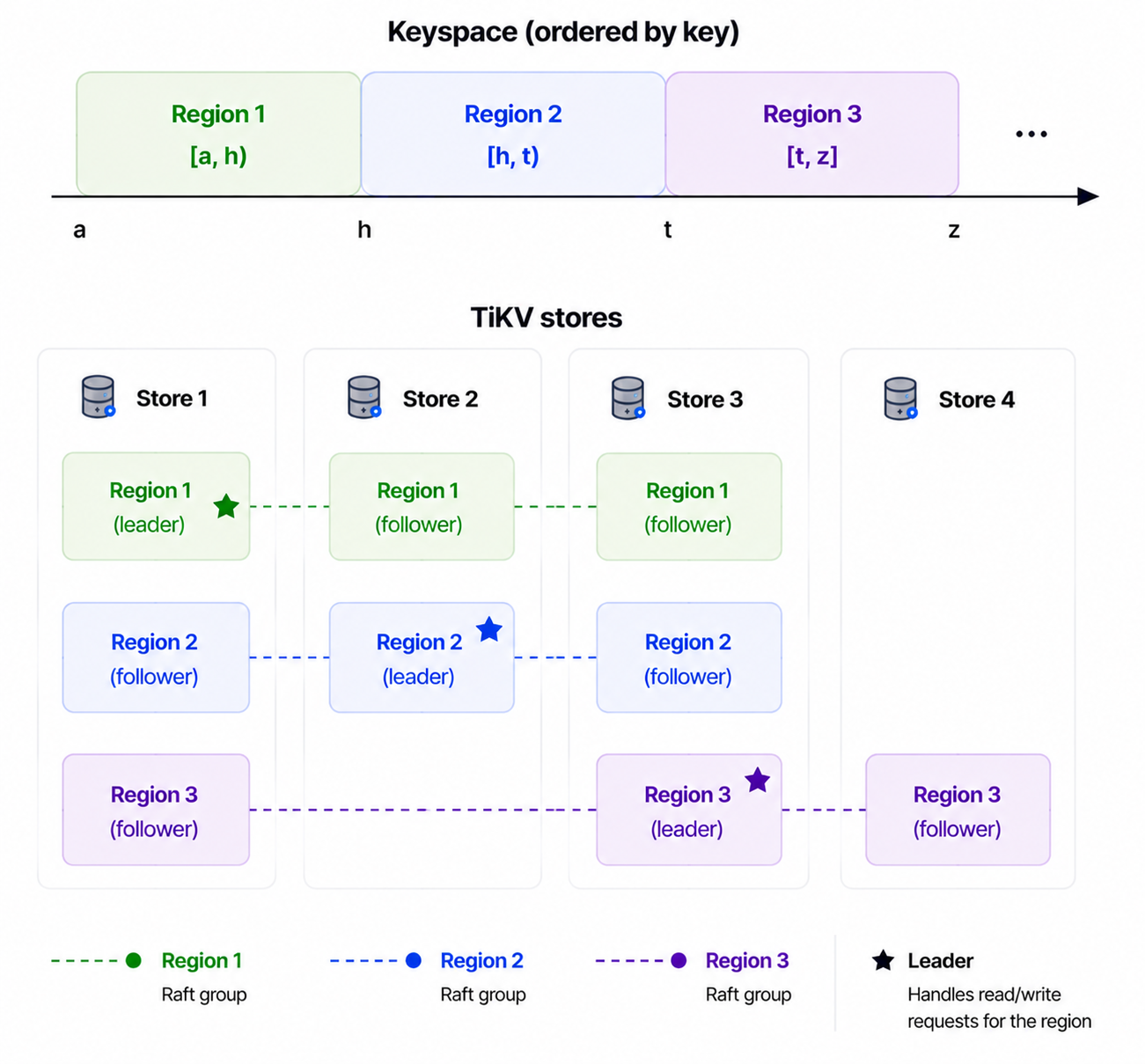
If one TiKV store fails, other replicas of the same Region still exist on other stores.
Routing and PD
TiDB uses Region routing information maintained by PD to locate the leader replica.
key
 |
 v
Region
 |
 v
leader replica
 |
 v
TiKV store
PD maintains the cluster-wide view: where Regions are located, where their replicas are placed, and which store hosts each leader.
PD also keeps the cluster data balanced. It can schedule Regions between stores to balance data distribution and transfer leaders away from unhealthy stores.
In the TiDB ecosystem, PD also provides the timestamp used to establish transaction ordering for TiKV data. We will cover this later in the transaction sections.
With this picture, TiDB handles SQL, TiKV stores data through Regions and Raft groups, and PD manages cluster metadata and scheduling.
TiKV 301: TiKV Architecture
In this chapter, we take a first look inside TiKV. TiKV is made up of a few major components.
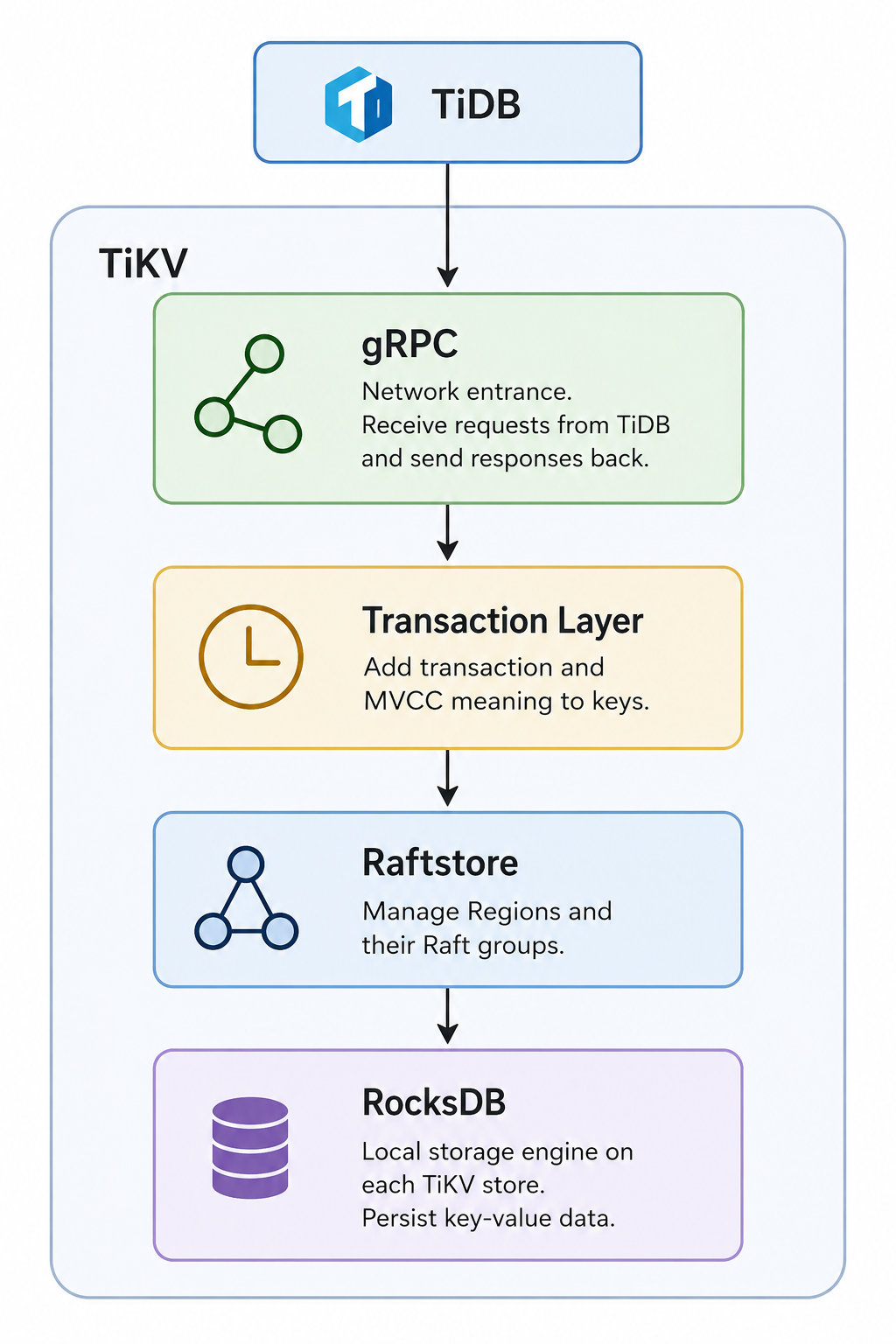
At this level, it is enough to get familiar with the names. Some words may not be fully clear yet. We will revisit these concepts again in later chapters.
Starting from the bottom, RocksDB is an open-source, single-machine key-value store. It is the KV engine TiKV uses to persist data on each store.
On top of RocksDB, Raftstore makes TiKV a distributed key-value store across multiple nodes. It does this through the Raft consensus protocol. Raftstore manages the Raft replication of different Regions, their lifecycle, and their movement across stores.
This is where a large part of TiKV's management work lives. It is also where much of the code complexity begins. We will approach it bit by bit.
Above Raftstore, the transaction layer gives TiKV transaction semantics. One core idea here is MVCC: TiKV adds versioned meaning to user keys so reads and writes can follow transaction rules. We will cover this in 404.
At the top, gRPC makes TiKV a server. It is an open-source RPC library that lets TiKV receive requests from clients such as TiDB and send responses back.
For now, keep the map: gRPC receives requests, the transaction layer adds transaction semantics, Raftstore manages distributed Regions through Raft, and RocksDB stores local key-value data.
RAFT 401: Raft Crash Course
Each Region has multiple replicas. The replicas are kept in sync through Raft.
How? Let's take a look.
First, each replica stores the data of a Region. At this level, think of the data as key-value pairs:
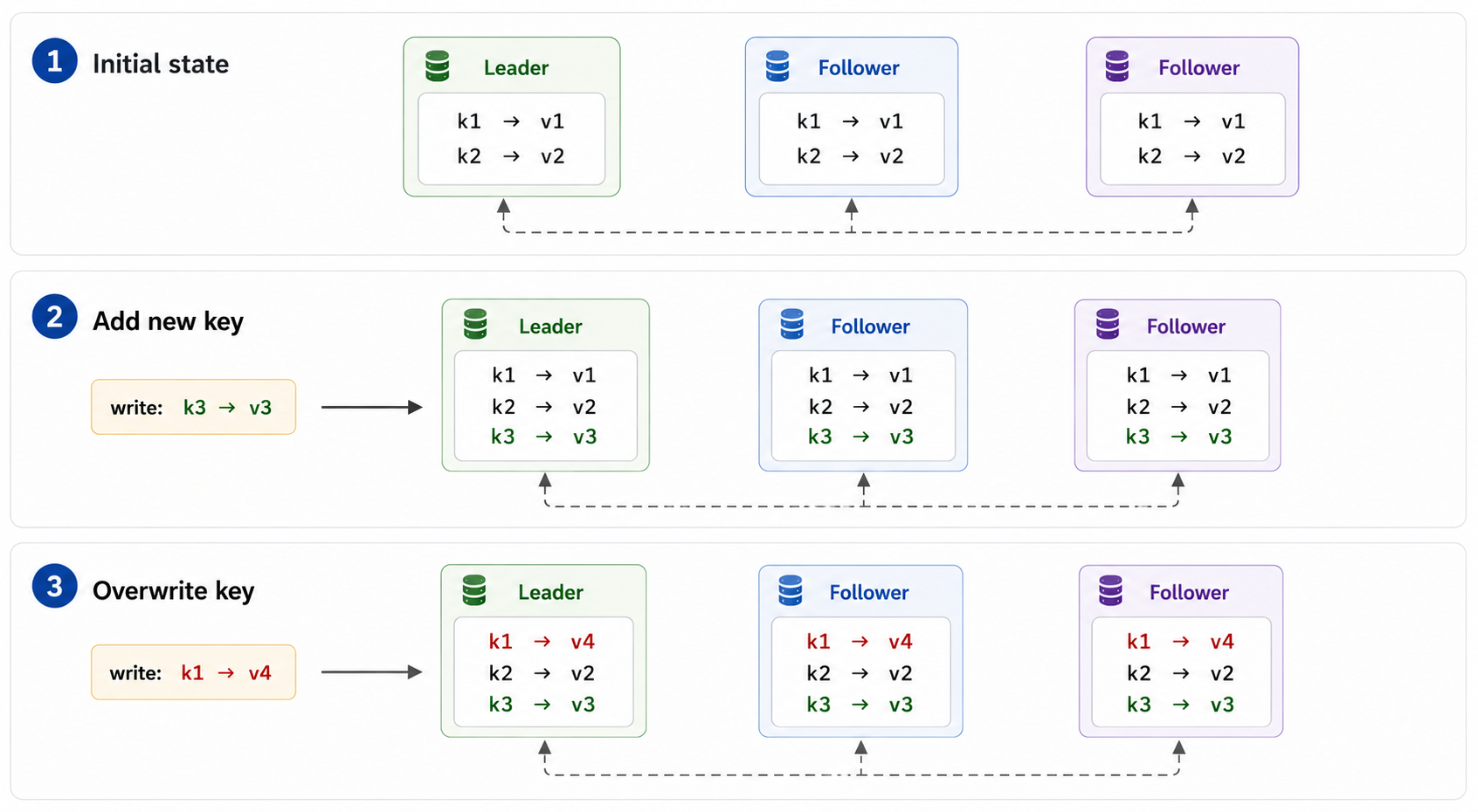
Figure 1. Same writes, same state.
The order of writes matters. If two writes touch the same key, different orders can produce different final states:
Order A:
(1) k1 -> v4
(2) k1 -> v5
final: k1 -> v5

Order B:
(1) k1 -> v5
(2) k1 -> v4
final: k1 -> v4
The key is to make all replicas observe write events in the same order. This gives the replicas a total ordering of events. If every replica applies the same events in the same order, the final data state is the same.
Raft does this by maintaining a log. A log is an ordered list of entries. Each entry is an event, usually a write to be applied.
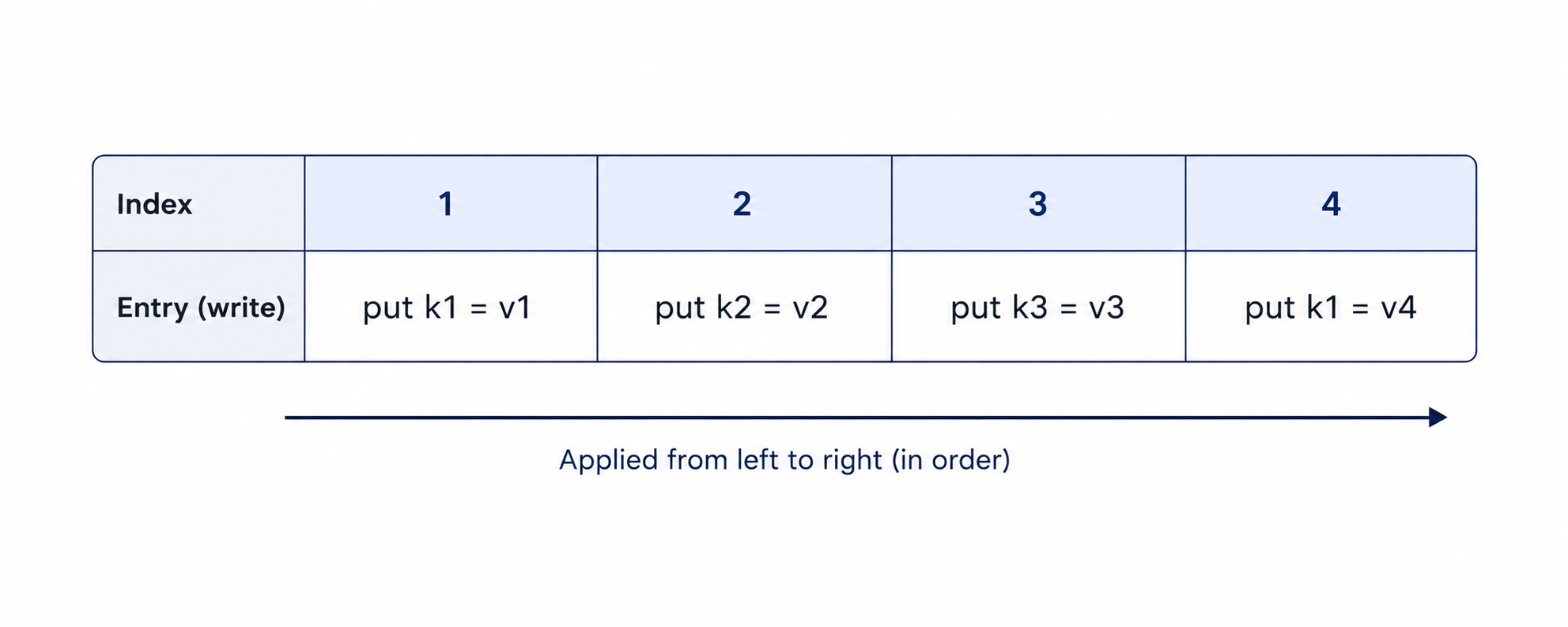
Figure 2. Log entries, applied in order.
If replicas keep the log in sync and apply it from left to right, they reach the same data state. This is the basic idea of using the log as the source of truth for data.
In the normal path, the log grows by appending new entries. Each entry has an index.
Roles
For normal replication, there are two roles: leader and follower.
The leader accepts new write requests from external clients. It appends each write as a new log entry, then sends that entry to followers.
A follower does not accept new writes for the Region. It follows the leader's log. If a write request reaches a follower, the follower rejects it.
Typically, the leader sends Raft log entries to followers. Followers do not talk to each other. They receive entries from the leader.
The leader also sends periodic heartbeats to followers to signal that it is still alive.
Who should be the leader? It is chosen by election. The leader can change. Each election has a term. A term is a monotonically increasing number.
Each write is labeled with the leader's term before it is sent to followers. In the log, each entry is labeled with an index and a term.
| index | 1           | 2           | 3           |
| term  | 7           | 7           | 8           |
| entry | put k3 = v3 | put k1 = v4 | put k1 = v5 |
Leader Election
If a follower stops hearing heartbeats from the leader, it waits for an election timeout, becomes a candidate, increases the term, and asks other replicas to vote.
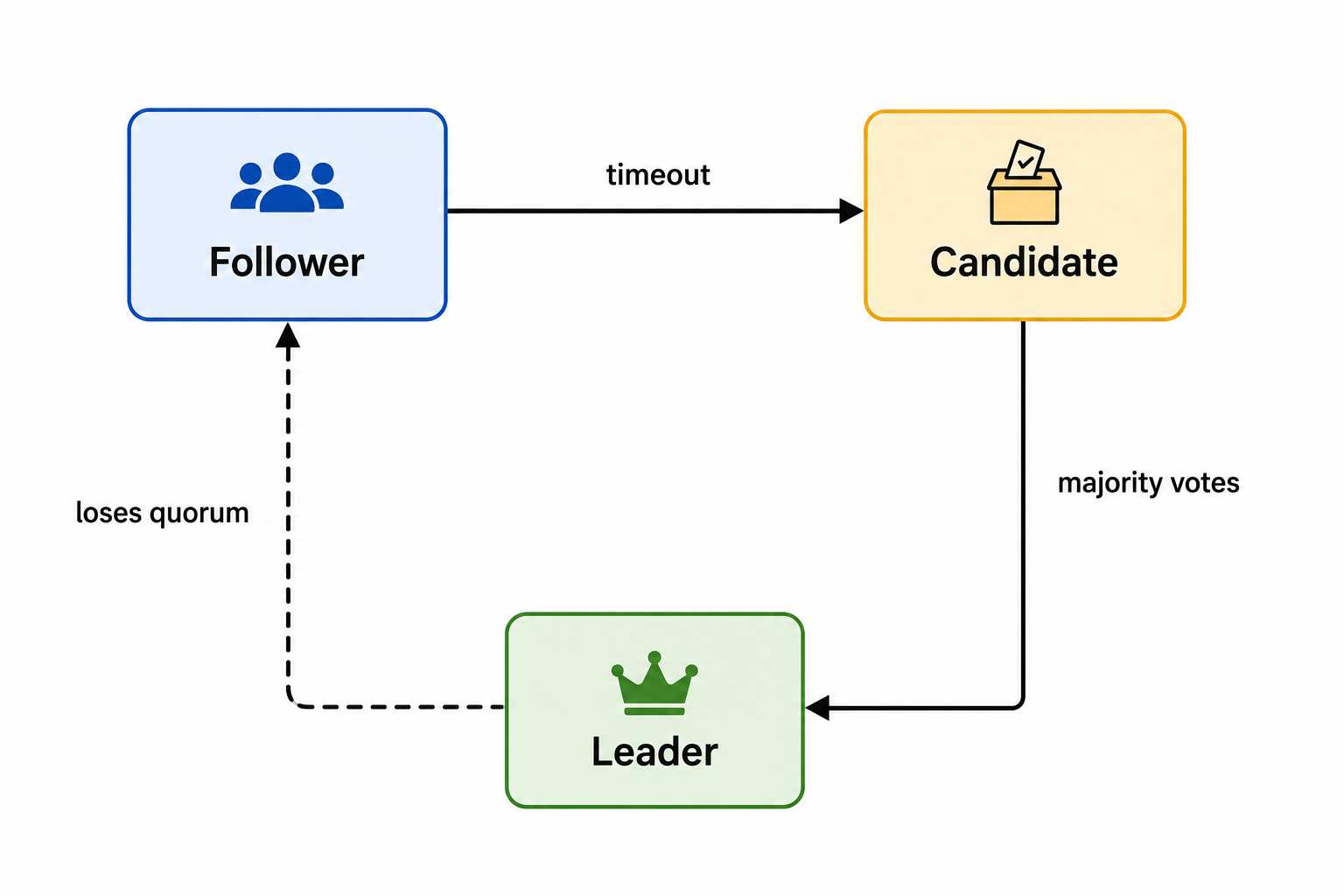
Figure 3. Leader election state transitions.
A candidate is a replica trying to become the next leader.
If the candidate gets votes from a majority of replicas, it becomes leader.
If no one wins, replicas wait for randomized timeouts and try again with a higher term. The random wait helps avoid everyone starting elections at the same time forever.
A replica votes only if the candidate's log is at least as up to date as its own log.
Up to date means:
- The candidate's last log entry has a higher term.
- Or the last log term is the same, and the candidate's last log index is at least as large.
voter last log:     index 8, term 3

candidate A:        index 7, term 4   -> can be voted for
candidate B:        index 9, term 3   -> can be voted for
candidate C:        index 9, term 2   -> rejected
candidate D:        index 7, term 3   -> rejected
Commit
A leader cannot apply a new write just because it has appended the entry locally. If it applied the entry immediately and then failed, that entry might be missing from the next leader.
The leader waits until the entry has been persisted by a majority of voting replicas. Then it can advance the commit index.
3 voting replicas

leader:   [1] [2] [3]
follower: [1] [2] [3]
follower: [1] [2]

entry 3 is on a majority -> entry 3 can be committed
The commit index marks the highest log index known to be safe. Entries with index less than or equal to the commit index can be applied to the data state.
Committed means the entry is settled in the history of the log. It will not be removed by a future leader. If you want to undo its effect, you need another log entry.
It can be proven that once an entry is committed, it will not be lost as long as a majority of voting Raft peers survives. We will not go into the detailed proof here, but the idea is majority overlap. A future leader also needs votes from a majority. That majority overlaps with the majority that stored the committed entry. Since voters reject candidates whose logs are behind, the future leader must contain the committed entries.
A leader only advances the commit index after an entry from its own term has been replicated to a majority. Older entries can become committed together with that current-term entry.
Learners
Raft can also have learners. A learner receives log entries from the leader and keeps its log up to date, but it does not vote.
Learners are useful when adding new replicas. The new replica can first catch up as a learner, without immediately changing the voting group that protects correctness.
Raft APIs
Raft communicates through just a few message types. At this level, only two matter:
- AppendEntries - sent by the leader to replicate log entries and maintain leadership.
- RequestVote - sent by a candidate during an election to ask other replicas for their votes.
You do not need to know the message formats yet. Just remember their roles:
Leader
   |
   | AppendEntries
   v
Followers

Candidate
   |
   | RequestVote
   v
Other replicas
Both messages are request-response RPCs.
For AppendEntries, a follower replies whether it accepted the new entries. If its log has diverged from the leader's, it rejects the request. The leader then backs up and retries with earlier entries until both logs share a common history. Once they do, the follower discards its conflicting entries and catches up to the leader.
For RequestVote, a replica simply replies whether it grants its vote to the candidate.
That's enough to understand the rest of Raft. Almost everything the protocol does is built on these two messages.
For TiKV, this is the first Raft model to keep in mind: one Region has multiple replicas, one replica leads, writes become ordered log entries, and committed entries survive leader changes as long as a majority of voting replicas survives.
RAFTSTORE 402: The Raft Event Loop
TiKV uses raft-rs to implement the Raft protocol. raft-rs is a Rust implementation of Raft modeled after the Go Raft library used by etcd.
The library maintains the internal Raft state of each peer and exposes a small set of APIs that TiKV uses to drive it.
The three most important APIs are step, ready, and advance.
step: Feed an Event into Raft
TiKV uses step to pass an incoming Raft message to a peer. The message might be an AppendEntries, a vote response, or another message from a remote peer.
A new command from the application follows the same general idea, although it normally enters raft-rs through a proposal API rather than directly through step.
When raft-rs receives an event, it updates the peer's in-memory Raft state and decides what should happen next. It does not perform the resulting disk or network operations itself.
ready: Ask Raft What Needs to Be Done
TiKV calls ready to retrieve the work that raft-rs has produced.
A Ready value may contain three main kinds of work:
- Raft messages that should be sent to other peers.
- Raft state and log entries that should be persisted.
- Committed log entries that should be applied to the state machine.
raft-rs decides that this work is necessary, but TiKV is responsible for actually performing it.
advance: Report That the Work Is Complete
After TiKV finishes processing a Ready, it calls advance.
This tells raft-rs that the previous batch of work has been completed. The peer can then continue processing events and produce more work.
The basic loop is therefore:
feed an event into raft-rs
ask for the pending work
perform that work
report that the work is complete
repeat
A Concrete Example
Suppose a follower receives an AppendEntries message from its leader.
TiKV passes the message to the follower's raft-rs peer through step. raft-rs checks the message and updates its in-memory state.
At this point, however, no log entry has been written to disk and no response has been sent over the network.
TiKV then calls ready. The returned Ready may contain:
persist:
    a new Raft log entry

send:
    a response to the leader
TiKV performs those operations and then calls advance to report that the Ready has been processed. After that, it continues with the next event, if there is one.
The Peer FSM
In TiKV's Raftstore, each Region peer is driven by a component called a PeerFsm.
The name describes its role well: it is a finite-state machine that repeatedly receives events, drives the corresponding raft-rs peer, and processes the work returned through Ready.
The core event loop of a Raft peer is:
Receive an event.
Let raft-rs make a decision.
Perform the resulting work.
Continue.
With this picture, we have described the core process of a single-Region Raftstore: it receives an event, drives the Region's raft-rs peer, performs the work returned through Ready, and continues. This is the execution loop behind the Raftstore layer introduced in TiKV 301: TiKV Architecture.
ROCKSDB 403: RocksDB Intro
RocksDB is an open-source, embedded key-value storage library. TiKV uses it as a local, single-node KV store.
A write stores a value under a key. Writing the same key again logically replaces its previous value:
put("name", "Alice")
put("name", "Bob")

get("name") -> "Bob"
Versions
Internally, RocksDB keeps versions of a key rather than immediately overwriting the old value. Each write receives an increasing number called a sequence number.
Conceptually:
"name" at sequence 10 -> "Alice"
"name" at sequence 20 -> "Bob"
Snapshots
A RocksDB snapshot is associated with a sequence number. It represents a consistent view of the KV store at that point in time.
For example:
write "name" = "Alice"
take snapshot S
write "name" = "Bob"
A normal read now returns "Bob", while a read through snapshot S still returns "Alice".
Old versions must remain available as long as an active snapshot may still need them. The oldest active snapshot therefore helps determine which versions can eventually be physically removed.
Reading
TiKV can read from a snapshot in two main ways:
- A point lookup retrieves one key.
- A range scan calls
seekto find a starting position, then repeatedly callsnextto move forward.
We will discuss how RocksDB stores and searches for these keys when we introduce its LSM-tree structure.
Column Families
A RocksDB database can contain multiple column families. For now, think of them as physically separated key-value spaces inside the same database.
TiKV commonly uses:
defaultfor values.writefor transactional MVCC records.lockfor transaction locks.
RocksDB is a local, versioned KV store. Writes create versions, snapshots provide consistent views of those versions, and column families separate different kinds of data.
TXN 404: Transaction Intro
A transaction is a group of reads and writes that must be treated as one logical action. For example, transferring money between two accounts must either update both balances or leave both unchanged. Other transactions must not see a half-finished transfer.
Transactions may run at the same time. When they do, the database needs a rule for what each transaction is allowed to see. This rule is called the isolation level.
TiDB's REPEATABLE READ behavior is based on snapshot isolation. Under snapshot isolation, a transaction reads from one consistent snapshot of committed data. Changes committed by other transactions later do not change what it sees.
A Stable Read View
When a transaction begins, TiDB gets a timestamp from PD called start_ts. This identifies the snapshot the transaction reads from.
When the transaction commits, TiDB gets another timestamp called commit_ts. This determines when its writes become visible to other transactions.
Transaction A                         Transaction B
begin
start_ts = 10
                                      begin
                                      start_ts = 12

read snapshot at 10
                                      update the key
                                      commit
                                      commit_ts = 18

read snapshot at 10

commit
commit_ts = 24
Although Transaction B commits at timestamp 18, Transaction A continues reading the snapshot at timestamp 10. When Transaction A eventually commits, its own writes become visible at timestamp 24.
This choice creates a requirement for TiKV: it must still be able to return the version visible at start_ts, even when newer versions have already been committed.
Keeping Key History
TiKV does this with MVCC, or Multi-Version Concurrency Control.
The basic idea is simple: instead of keeping only the latest value of a key, TiKV keeps multiple committed versions.
balance
  commit_ts 8  -> 100
  commit_ts 15 -> 80
  commit_ts 21 -> Delete
To read at a particular timestamp, TiKV chooses the newest version whose commit_ts is not greater than the read timestamp.
read_ts 12 -> 100
read_ts 18 -> 80
read_ts 25 -> key not found
A delete adds a Delete record. It does not immediately remove the older history, because an older snapshot may still need it.
Committing Across Regions
MVCC gives a transaction a stable read view. A separate problem remains: how can one transaction update several keys as one logical action?
Those keys may belong to different Regions. Each Region has its own Raft group, so no single Raft command can commit all of the writes together.
TiKV's basic transaction protocol follows the Percolator model. TiDB coordinates the operation and chooses one written key as the transaction's primary. The primary records the transaction's final outcome; the remaining keys are secondaries. This is a transaction-protocol role, not necessarily a table's SQL primary key.
Percolator model: Prewrite all keys, choose one key as the primary, then commit the primary before the secondary keys.
TiDB
  |
  | prewrite(start_ts)
  +----> primary key
  +----> secondary keys
  |
  | commit primary(commit_ts)
  +----> primary key
  |
  | commit remaining keys
  +----> secondary keys
Phase 1: Prewrite
TiDB groups the mutations by Region and sends prewrite requests to the relevant TiKV peers.
For each key, TiKV checks whether the write can proceed, stores the new value, and places a transaction lock on the key.
The lock means that this key has a pending write from the transaction identified by start_ts. The transaction's primary key records its final outcome.
There is no committed write record yet, so readers do not treat the new value as committed.
The transaction can proceed only after all of its prewrites succeed. Otherwise, it rolls back.
If any prewrite fails, TiDB rolls back the keys that were already prewritten. A rollback removes the pending lock and value, and records that the transaction's start_ts was rolled back.
Phase 2: Commit
If every prewrite succeeds, TiDB obtains commit_ts from PD and commits the primary key first.
Committing a key does two things:
remove its transaction lock
add a committed version at commit_ts
Once the primary key has committed, the transaction's outcome is committed. TiDB then commits the secondary keys using the same commit_ts.
Persisting the Transaction State
Prewrite and commit are separate requests. After prewrite finishes, TiKV must remember that the value exists but has not yet committed.
This state cannot live only in memory. TiKV persists it in RocksDB:
Three Column Families
TiKV stores transaction data in three RocksDB column families:
default CF
  (key, start_ts) -> value

lock CF
  key -> { start_ts, primary }

write CF
  (key, commit_ts) -> { kind, start_ts }
The default CF stores the value written by the transaction.
It uses start_ts because TiKV stores the value during prewrite, before the transaction has a commit_ts.
The lock CF stores pending writes. Its record identifies the transaction and points to its primary key.
The write CF stores committed history. A write record says whether the version is a Put or Delete, when it committed, and which start_ts identifies its value in the default CF.
The two phases now map directly to the column families:
Prewrite

default CF <- store value
lock CF    <- store transaction lock


Commit

lock CF    <- remove transaction lock
write CF   <- add committed version
Reading at a Timestamp
For each key, versions in the write CF are ordered from newer to older.
To read a key at read_ts, TiKV finds the newest committed version whose commit_ts is no greater than read_ts.
For example:
write CF

(balance, commit_ts 21) -> { Delete }
(balance, commit_ts 15) -> { Put, start_ts 9 }
(balance, commit_ts 8)  -> { Put, start_ts 3 }
A read at timestamp 18 skips the version committed at 21 and selects the version committed at 15.
That write record points to start_ts = 9, which TiKV uses to find the value:
default CF

(balance, start_ts 9) -> 80
The read therefore returns 80.
If the selected write record is a Delete, the key does not exist in that snapshot.
Before reading the committed version, TiKV also checks the lock CF for a pending transaction that affects the read.
TXN 607: Transaction Scheduler covers transaction command execution, latches, and lock resolution in more detail.
RAFTSTORE 501: Raftstore Write Flow
In RAFTSTORE 402, we followed the event loop for a single Region peer. We saw how the peer FSM processes events, passes incoming Raft messages to raft-rs, and handles the resulting Ready.
That gave us the shape of the loop, but left much of the work behind Ready unexplained. A Ready may contain outgoing messages, Raft log entries and state to persist, and committed entries to apply.
This chapter fills in those missing parts. We will first see where the persistent state is stored, then follow one write through the complete loop, and finally extend the same process from one Region to many.
Raft Engine and KV Engine
The storage work is divided between two local engines:
- The Raft Engine stores Raft log entries and persistent Raft state.
- The KV Engine stores the Region's key-value data. In TiKV, the KV Engine is RocksDB.
The two engines represent the same Region in different forms:
Raft Engine: replicated history of commands
KV Engine:   data produced by applying those commands
A command first becomes part of the replicated Raft history. Once that command is committed, its effect is applied to the KV Engine.
Following one write shows how these two forms remain connected.
A Write Through Raftstore
A write reaches the peer for its target Region as a local command. For example, the command may contain several key-value modifications:
put("cart:42", "checked-out")
delete("cart:42:temporary-note")
Submitting a command to Raft is called proposing it. A proposal asks raft-rs to place the command in the replicated Raft log.
Like an incoming Raft message, the local command is processed by the peer FSM. The main difference is how the event enters raft-rs:
incoming Raft message -> step
local command         -> propose
After either operation, the peer returns to the same loop and checks whether raft-rs has produced a Ready.
Only the Region leader can propose the command. If the local peer is not the leader, it rejects the request so that the caller can send it to the correct store.
On the leader, the proposal creates a new Raft log entry. The next Ready tells Raftstore to persist that entry in the local Raft Engine and send AppendEntries messages to the followers.
Each follower processes the incoming message through the message path described in RAFTSTORE 402. Its own Ready tells Raftstore to persist the entry in that follower's Raft Engine before responding to the leader.
Once the leader learns that a majority has persisted the entry, raft-rs can mark it committed. The committed entry then appears in a later Ready. Raftstore applies it by interpreting the command and writing its modifications to the KV Engine.
The complete write flow is therefore:
local command
    |
    v
propose to raft-rs
    |
    v
Raft log entry
    |
    v
persist and replicate
    |
    v
commit
    |
    v
apply to the KV Engine
Followers learn the new commit position through later Raft messages and apply the same command to their own KV Engines.
This describes the flow for one Region. A real TiKV store must perform the same work for many Regions at once.
Processing Many Regions in Batches
Each Region peer has its own mailbox, a queue of pending events for its peer FSM. It also has its own Raft state machine, commit index, and apply index.
Raftstore could process every peer independently and issue a separate engine write for each Ready. That hypothetical approach would produce many small I/O operations:
Region 1 -> small Raft Engine write
Region 2 -> small Raft Engine write
Region 3 -> small Raft Engine write
But this is not how TiKV operates. Small writes have a fixed cost, so Raftstore combines work from multiple Regions into fewer, larger writes:
Region 1 Ready ---\
Region 2 Ready ----> one larger Raft Engine write
Region 3 Ready ---/
Raftstore does this through two major batch systems:
- the Raft batch system;
- the apply batch system.
The Raft Batch System
The Raft batch system drives the peer FSMs for many Regions.
For each peer, it takes events from the mailbox, calls into raft-rs, and collects the resulting Ready work. It then coordinates that work across multiple peers by:
- batching Raft Engine writes;
- sending outgoing Raft messages;
- forwarding committed entries to the apply batch system;
- advancing each peer after the required work has completed.
The single-Region event loop from RAFTSTORE 402 still exists. The Raft batch system simply processes many instances of that loop together.
The Apply Batch System
The apply batch system receives the committed entries produced by the Raft batch system.
Each Region has its own ApplyFsm, which applies that Region's entries in Raft log order. Applying an entry may produce operations such as:
put key
delete key
update Region metadata
advance apply index
The apply system groups changes from multiple ApplyFsms into larger KV Engine write batches.
The two systems therefore divide the work along the same boundary as the two engines:
Raft batch system
  drive peer FSMs and raft-rs
  persist Raft logs and state
  send Raft messages
          |
          | committed entries
          v
Apply batch system
  apply commands
  update apply indexes
  write to the KV Engine
Because the Raft and apply systems progress separately, a committed entry may not yet be reflected in the local KV Engine. TiKV records that difference so it can recover correctly after a restart.
Restart Recovery
The apply index records the highest Raft log index whose effects are already present in a Region's local key-value data.
For example, a Region may temporarily have:
commit index: 105
apply index:  102
Entries 103 through 105 are already committed, but this store has not yet applied them to its KV Engine.
Whenever the apply system processes an entry, it writes the command's data changes and the new apply index in the same KV Engine write batch. Applying entry 103 therefore produces a batch containing both:
changes produced by entry 103
apply index = 103
The data and the apply index advance atomically. If TiKV crashes during this operation, the recovered KV Engine reflects either both changes or neither:
entry 103 not applied
apply index = 102
or:
entry 103 applied
apply index = 103
When TiKV restarts, the Raft Engine provides the persisted Raft state and log entries, while the KV Engine provides the materialized data and apply index.
If the recovered positions are:
commit index: 105
apply index:  102
TiKV knows that entries 103 through 105 still need to be applied. During startup, if the commit index is ahead of the apply index, TiKV forces the peer to handle a Ready. Its committed entries are scheduled to the apply system, which applies them and advances the apply index until it reaches 105.
The Interface Used by the Transaction Layer
The transaction layer does not interact directly with peer FSMs, raft-rs, or either storage engine. It accesses Raftstore through two main asynchronous operations:
async_writeasync_snapshot
Both operations are asynchronous because Raftstore runs on its own event loops. The caller submits a request with a callback, allowing Raftstore to complete the required Raft, network, and storage work before returning the result.
async_write
async_write submits a batch of key-value modifications.
Raftstore routes the command to the target Region peer, proposes it through Raft, and invokes the callback after the command has been committed and applied to the leader's KV Engine.
async_write
    |
    v
peer mailbox
    |
    v
propose
    |
    v
persist and replicate
    |
    v
commit
    |
    v
apply
    |
    v
callback
The transaction layer therefore sees one asynchronous write operation, while Raftstore handles the full replicated write flow underneath it.
async_snapshot
async_snapshot asks Raftstore for a readable snapshot of a Region.
Raftstore first establishes the required Raft read position and waits until the local KV Engine reflects that position. It then returns a snapshot that the transaction layer can use for point reads and scans.
We will examine this path in more detail in RAFTSTORE 502: Linearizable Reads.
RAFTSTORE 502: Linearizable Reads
In RAFTSTORE 501, we followed an async_write from proposal to callback. The callback notifies the client that the write has completed. By the time it runs, the write has already been applied to RocksDB.
For reads, Raftstore provides the async_snapshot API, which returns a RocksDB snapshot. The caller uses the returned snapshot to read RocksDB and serve point reads, batch reads, and scans.
Raftstore's async_snapshot must provide linearizable reads. A linearizable read must observe every write that completed before it began.
What a Linearizable Read Must See
This rule preserves real-time ordering:
async_write
    request --- replicate --- apply --- complete
                                           |
                                           | must be visible
                                           v
async_snapshot                             request --- snapshot
If a client successfully writes k = v and then reads k, the read cannot return the old value. Without this property, the system would be hard to reason about: a client could not even read back a write that had already succeeded.
When a write and read overlap, they are concurrent: neither operation completed before the other began. The read may return either the old or new value, because either order is valid.
Recall from ROCKSDB 403 that taking a RocksDB snapshot records the latest internal sequence number at that moment. To satisfy the rule above, Raftstore must take the snapshot after all earlier completed writes have been applied.
The Slow Baseline
One naive approach is to propose an empty Raft entry for every read and take the RocksDB snapshot when that entry is applied. This guarantees linearizability: Raft orders the entry after all preceding writes, and applies entries in order.
propose an empty Raft entry
            |
            v
replicate, commit, and apply it
            |
            v
take a RocksDB snapshot
This is correct but too expensive. A read would pay nearly the full cost of a write without changing data.
The Leader Intuition
Set aside the brief period immediately after an election and consider the normal case.
Every completed async_write has already been applied to the leader's RocksDB. The leader may have newer entries that are committed but not yet applied, but those writes have not completed. Its RocksDB therefore contains every write that a new linearizable read is required to observe.
The read does not need another Raft entry or additional apply work. It only needs to establish that this peer is still the leader.
This is the idea behind a lease read.
Lease Read
In the normal case, the leader's RocksDB already contains every completed write. The only remaining question is whether this peer is still the leader.
Raftstore answers this question with a leader lease, an extension to the basic Raft protocol. The leader sends heartbeats to the followers. When a quorum acknowledges the leader's recent Raft messages, the leader establishes or renews its lease.
The lease period is shorter than the election timeout. While the lease remains valid, another peer cannot win an election and become the leader. The local peer can therefore trust that its leadership is still current.
For a typical leader, this is enough:
leader lease is valid
          |
          v
take a local RocksDB snapshot
          |
          v
serve the read
This is called a lease read, or local read. It is the fast path: no new Raft entry, no apply work, and no network round trip for the read itself.
The fast path is not immediately available in two cases.
First, the leader may have just won an election. Its Raft log contains the committed history, but its RocksDB state may still be catching up. Before serving a local read, it must apply an entry from its current term.
new leader
    |
    v
apply an entry from the current term
    |
    v
all earlier committed entries have reached RocksDB
Raft applies entries in order. Once an entry from the current term has been applied, every earlier committed entry, including entries from previous terms, has also been applied.
Second, the leader's lease may be expired or uncertain. In that case, the peer cannot determine from local state alone whether it is still the leader. It uses ReadIndex instead.
ReadIndex
ReadIndex confirms leadership through a quorum without adding a new entry to the Raft log.
The leader sends heartbeats for the pending read and waits for acknowledgements from a quorum:
lease is uncertain
        |
        v
send ReadIndex heartbeats
        |
        v
quorum confirms leadership
        |
        v
take a RocksDB snapshot
Once the quorum responds, the peer knows that it is still the leader. As long as its local RocksDB state is ready, Raftstore can take the snapshot and serve the read.
If the peer discovers a newer term, it is no longer the leader and rejects the request. If it cannot contact a quorum, it cannot safely complete the read.
ReadIndex is slower than a lease read because it requires a network round trip, but it is still much cheaper than proposing an empty Raft entry. It confirms leadership without writing, persisting, or applying a new log entry.
The Complete Flow
async_snapshot
      |
      v
is the local peer the leader?
      |
      +-- no --> reject
      |
      v
has it applied into its current term?
      |
      +-- no --> wait or use ReadIndex
      |
      v
is the leader lease valid?
      |
      +-- yes --> take a RocksDB snapshot
      |
      +-- no --> ReadIndex confirms a quorum --> take a snapshot
The returned snapshot includes every write that completed before the read began. That is a linearizable snapshot.
COP 503: Coprocessor Intro
In RAFTSTORE 502, Raftstore returned a snapshot that gives a reader a consistent view of one Region's data. TiKV can use the snapshot to read a single key or scan a key range.
This chapter follows the range-scan path used for SQL queries. TiDB can push part of a query plan to TiKV, where the coprocessor, or cop, scans the relevant keys and performs the requested computation.
Push Computation to Storage
A table may span many Regions distributed across different TiKV stores. Consider this query:
SELECT COUNT(*) FROM orders WHERE status = 'paid';
Without pushdown, TiDB would fetch the scanned rows from those Regions, then filter and count them itself.
TiKV scans rows -> scanned rows -> TiDB filters and counts
The answer is one number, but all the scanned rows cross the network.
With pushdown, TiDB sends the filter and count operation with the scan request. Each TiKV task scans its portion of the table, keeps the paid rows, and returns a partial count. TiDB then adds the counts together.
TiKV scans, filters, and counts -> partial counts -> TiDB combines
The input data remains close to storage, and only the much smaller partial results cross the network.
Cop supports more than this particular combination. Filters select rows, aggregations such as COUNT and SUM reduce many rows to a value, and TopN keeps the first N rows under an ordering. TiDB can combine such operators and push the resulting work to TiKV.
Cop Tasks
TiKV stores table rows and index entries as ordered keys. A table or index scan therefore becomes a scan over a continuous interval of keys.
That interval may span multiple Regions. TiDB splits it at Region boundaries and sends a cop task to each relevant Region. These tasks can run in parallel across TiKV stores.
TiDB cop request
        |
        v
Raftstore obtains a snapshot
        |
        v
scan the Region's key interval
        |
        v
run the pushed-down operators
        |
        v
return a partial result
Each task processes only its Region's portion of the data. For the COUNT example, each task returns a partial count, and TiDB adds them together.
The Read Pool
TiKV runs cop tasks on read-pool workers. A task occupies a worker while it scans data and executes operators.
Its cost depends on the data scanned and the computation performed, not only on the result size. Broad scans or expensive operators can therefore keep workers busy even when they return little data. When all workers are busy, later tasks wait and latency rises.
COP 606 will examine TiKV key mapping and common coprocessor access patterns in more depth.
RAFT 601: Leader Transfer
Besides a leader change triggered passively by failure or an election timeout, Raft also supports an active leader transfer.
Why is it needed? First, for load balancing: a cluster may have hundreds of thousands of Regions, and their leaders should be distributed evenly. Second, during a rolling restart, PD can evict leaders before restarting a TiKV store to reduce the availability impact.
Leader transfer is initiated by PD. PD sends the current Raft leader a candidate set: the peers that are acceptable new leaders.
TiKV chooses one candidate from that set, usually the peer whose Raft log is the most caught up. A more current peer can complete the transfer with less waiting. Sometimes PD sends a set containing only one peer. In that case, PD has fixed the target rather than leaving TiKV a choice.
Raftstore Level
TiKV first performs a handshake. The leader sends a MsgTransferLeader message to the target follower. The follower performs checks, then replies with the same message type as an acknowledgement.
The follower rejects the request when, for example:
- its term does not match the leader's term;
- it is not a voting peer;
- it has a pending snapshot;
- its disk usage is unacceptable.
The acknowledgement contains the follower's applied index. The leader compares it with its own last index and requires the gap to stay below a configured threshold, 128 by default. This ensures that the target is reasonably close to being fully applied. Without an acknowledgement, the transfer cannot proceed.
There is a more complicated path for in-memory pessimistic locks. A leader transfer may ask for a second acknowledgement to transfer that lock state between peers. TXN 803 introduces that case. For now, consider the no-lock path.
If everything looks good, TiKV calls RawNode::transfer_leader(), which steps a local MsgTransferLeader into raft-rs.
raft-rs Level
The leader stops accepting new proposals. This is why the target should already be reasonably close: otherwise, the interval during which the Region cannot accept new writes becomes longer.
If the target has not fully caught up, the leader sends it more MsgAppend messages. Once the target's matched index reaches the leader's last index, the leader sends MsgTimeoutNow to trigger an immediate election on the target.
leader stops proposals
        |
        v
target catches up through MsgAppend
        |
        v
leader sends MsgTimeoutNow
        |
        v
target starts an election
        |
        v
target becomes leader
Because the target's log is fully caught up, it should be able to secure enough votes when a quorum is available. The election still follows the normal Raft safety rules. Leader transfer only triggers the election more directly.
RAFT 602: Replica Movement
Moving Replicas
Leader transfer moves only the leader role and involves no data movement. This chapter covers moving replicas.
Replica movement is needed when TiKV stores are added or removed during cluster scale-out or scale-in. PD also uses it to balance data between stores. For example, PD may add a replica to one store and remove another replica from a different store while keeping the usual replication factor of three.
PD has the global view. It decides which peer to add or remove and on which store. The current Region leader receives the request and checks that the request is still valid, that the requested peer change makes sense, and that another change is not already in progress.
A Region's configuration is the set of peers that belong to its Raft group, including which peers can vote. Adding or removing a peer is a configuration change, or conf change.
It is easier to start with raft-rs.
raft-rs Level
raft-rs exposes two important APIs for a conf change:
propose_conf_changeapply_conf_change
propose_conf_change is similar to proposing a normal Raft log entry. It creates a special entry that describes a peer change. Raft replicates and commits that entry through the normal log path.
propose conf change
        |
        v
replicate to the Raft group
        |
        v
commit the entry
        |
        v
Raftstore's apply system applies the entry
After TiKV has made the peer change durable, it calls apply_conf_change. That makes the change effective in raft-rs's in-memory configuration. The change may add or remove a peer, and therefore change which peers can vote and how Raft calculates a quorum.
committed conf-change entry
        |
        v
TiKV makes the peer change durable
        |
        v
apply_conf_change
        |
        v
raft-rs updates its in-memory configuration
TiKV Level
TiKV records a Region's current key range, peer list, and version information as its Region metadata. The peer list describes the Region's configuration. Its configuration version increases whenever that peer list changes.
TiKV mirrors the raft-rs protocol from proposal through application.
First, the leader's peer event loop calls propose_conf_change. This creates the Raft entry described above. Raft then replicates and commits it in the normal way.
After the entry commits, Raftstore's apply system updates the Region metadata: it changes the peer list, advances the configuration version, and persists the new metadata.
The apply system then reports completion to the Region peer. The peer calls apply_conf_change to update raft-rs's in-memory configuration. It also updates the local runtime information used to route Raft messages and track peers.
The exact persistent records and internal messages that pass work between these components are implementation details. RAFTSTORE 901: Peer Lifecycle and Crash Recovery introduces them later. The important order here is: first persist the Region metadata; then update the in-memory Raft configuration.
peer event loop
  propose_conf_change
        |
        v
Raft commits the entry
        |
        v
Raftstore apply system
  update and persist Region metadata
  advance configuration version
        |
        v
Region peer event loop
  apply_conf_change
  update runtime state
Adding a Replica
The previous process happens on existing replicas. A newly added replica does not exist on its target store yet.
TiKV normally adds it as a learner first. After that peer change applies, the leader begins tracking how far the learner has caught up and sends it Raft messages.
When the target store receives an initial Raft message but has no peer for that Region, TiKV creates an uninitialized peer: a local placeholder that knows the Region exists but does not have its data yet.
The new peer then catches up through log replication or, more commonly, a Raft snapshot. The next chapter introduces that data-transfer path. Once it has caught up, PD can promote the learner to a voting peer.
Removing a Replica
Each existing replica applies the removal configuration change locally. If a peer finds that the change removes itself, it records durable removal state, stops its local event loops, and removes its Region data and Raft logs. The durable record prevents an old Raft message from recreating the removed peer.
A typical replica movement therefore looks like this:
add learner on the target store
        |
        v
initialize and catch up the new peer
        |
        v
promote the learner to voter
        |
        v
remove the old peer from the source store
This peer lifecycle is important and involved. Later chapters revisit its details through Raft snapshots, Region split, Region merge, and restart recovery.
RAFT 603: Raft Snapshot
As discussed in TiKV 201, a Region is the smallest unit of data movement between TiKV stores. In RAFT 602, we saw that moving a replica requires adding a peer on one store and removing it from another. This chapter looks at how the Region's data reaches the new peer.
The general problem has two parts:
- Bulk copy: copy the existing state to the new peer.
- Incremental catch-up: apply the changes that happen during or after the copy.
The second part is exactly what Raft's log provides. The leader sends the new peer the log entries after the copied state, and the peer applies them in order.
Why the Raft Log Is Not Enough
One possible way to copy a Region would be to replay its entire Raft log from the first entry to the latest one. In practice, this is too slow. More importantly, TiKV does not keep Raft log entries forever.
Raft log entries are stored in the Raft Engine. Each peer applies committed entries to its own local KV Engine, which is RocksDB. The log establishes the order of changes and drives the state transitions. Once the changes have been applied locally, the old log entries are no longer needed by that state machine. They are still needed by replicas that have fallen behind, but after the replicas have caught up, keeping every old entry would only consume disk space.
TiKV therefore periodically truncates old Raft log entries. The decision to truncate is coordinated through Raft, while the actual deletion is performed in the local Raft Engine after the operation is applied.
Now consider a follower whose log is behind the truncation point:
leader:   old entries removed | 81 | 82 | 83 | ...
follower: applied through 25
The follower needs entries 26 through 80, but the leader no longer has them. Incremental log replication cannot fill this gap. The leader must send a Raft snapshot.
A Snapshot Represents a State
Think of RocksDB as a state machine. Raft log entries are the ordered events that move the state machine forward. If replicas apply the same entries in the same order, they reach the same state.
Each Raft log position therefore corresponds to a particular state:
log index 80  ->  Region state after applying entries through 80
log index 81  ->  Region state after applying entry 81
A Raft snapshot captures the Region state at one Raft log position. A snapshot at index 80 contains all the Region's key-value data after entry 80 has been applied. Once a follower restores that snapshot, it can continue with ordinary log replication from entry 81.
follower before snapshot:  applied through 25
                                     |
                         install snapshot at 80
                                     v
follower after snapshot:   applied through 80
                            catch up from entry 81
This is the meaning of a Raft snapshot: it replaces a missing prefix of the log with the complete state produced by that prefix.
It is different from the RocksDB snapshot used for reads in ROCKSDB 403 and RAFTSTORE 502. A RocksDB snapshot provides a local read position. A Raft snapshot transfers Region state from one replica to another.
Generating a Snapshot
To construct a snapshot, TiKV must read all key-value data belonging to the Region and package it into data files. The data must correspond to a specific Raft index.
The local KV Engine records the peer's applied Raft index together with its data. When TiKV obtains a RocksDB snapshot for the Region, that applied index identifies the Raft position represented by the data. TiKV scans the Region through that RocksDB snapshot and writes the result into SST files.
An SST file is a sorted data file that RocksDB can add directly to its storage. The details of how RocksDB writes and organizes SST files are covered in ROCKSDB 605: RocksDB LSM Tree. For this chapter, it is enough to think of the files as a bulk representation of the Region's key-value state.
A snapshot contains both data and metadata:
snapshot
  Region metadata
  snapshot index and term
  Region key-value data in SST files
The snapshot index tells the receiver how much Raft history the data already includes. The snapshot term is the term of the log entry at that index. Together, the index and term identify the Raft position represented by the snapshot. The Region metadata identifies the key range and peer configuration that the snapshot belongs to.
Snapshot generation can be large and expensive. TiKV performs it in a separate snapshot worker pool so that a long Region scan does not occupy the normal Raftstore processing path.
How raft-rs Requests a Snapshot
When a follower rejects an AppendEntries request because its log is too far behind, the leader learns that ordinary replication cannot repair the gap. raft-rs then decides that the follower needs a snapshot.
raft-rs does not build the snapshot itself. Raftstore provides it with a storage adapter called PeerStorage. When raft-rs asks PeerStorage for a snapshot, PeerStorage starts or checks the background generation job.
Snapshot generation may not be finished when the request arrives. In that case, PeerStorage reports that the snapshot is temporarily unavailable. Raftstore tries again during a later Raft heartbeat, normally every two seconds, and can also check immediately when the background job finishes.
The interaction can be summarized as:
raft-rs decides a snapshot is needed
              |
              v
raft-rs requests one from PeerStorage
              |
              v
PeerStorage starts a snapshot worker job
              |
              v
snapshot worker scans RocksDB and builds SST files
              |
              v
PeerStorage returns the ready snapshot
The snapshot data files can be much larger than ordinary Raft messages. TiKV sends a snapshot through its dedicated Snapshot gRPC streaming API, rather than the normal Raft or BatchRaft APIs. This is a separate API endpoint and stream on the same TiKV gRPC server, not a separate port. The first snapshot chunk carries the Raft message and snapshot metadata; later chunks carry the SST data. This keeps bulk file transfer off the normal Raft message streams.
Receiving a Snapshot
The receiving peer must still clean up old data, install the SST files, and restore the snapshot's local state before ordinary log replication can continue. This is local storage work rather than a Raft protocol decision. We will look at it in more detail in RAFTSTORE 703: Region Worker.
RAFTSTORE 604: Region Split
A Region owns a continuous interval of the keyspace. A split divides that interval into two independent Regions. The resulting Regions have separate ranges, identities, Raft groups, and leaders. PD can schedule them independently afterward.
Suppose Region 10 owns [a, z) and TiKV chooses m as the split key:
before

Region 10: [a, z)

after

left:  [a, m)
right: [m, z)
A write to a key below m belongs to the left Region; a write to a key at or above m belongs to the right Region.
Region IDs and Epochs
The two resulting Regions need separate identities. PD allocates the new Region ID and the peer IDs for the new Region. For an automatic split, TiKV first asks PD for these IDs before proposing the split. PD acts as the cluster-wide allocator; TiKV does not invent the IDs locally.
TiKV uses a right-derived split by default. The right Region keeps the original Region ID and its existing peer identities. The left Region receives the new ID and peer IDs from PD:
before

Region 10: [a, z)

right-derived split

Region 20: [a, m)   <- new ID from PD
Region 10: [m, z)   <- original ID and peers
This is useful for workloads with monotonically increasing keys. New writes continue to land in the rightmost Region, so the active Region keeps its ID and peer identities. Its Region epoch still increments because its range changed.
TiKV also supports the opposite, left-derived arrangement. In either case, one side continues the original Region identity while the other becomes a new Region.
A Region also has an epoch, a version in its metadata. TiDB includes the epoch it knows in a request. When a split changes the Region's range, TiKV increments the epoch. A later Region merge also changes its range and increments the epoch; we will return to that later. A request carrying the old epoch is stale, so TiKV rejects it and TiDB refreshes its Region routing information.
The Split Command
A split is a Raft administrative command. The leader proposes it, and the replicas replicate and commit it through the normal Raft path:
leader proposes split command
          |
          v
replicas replicate the command
          |
          v
command commits
          |
          v
every replica applies the same new ranges
The split command is not a user key-value write. It is persisted as a Raft log entry, but applying it does not write a new user value to RocksDB. During apply, TiKV updates the Region metadata stored in RocksDB.
TiKV stores this metadata in a record called RegionLocalState. It describes the Region's key range, peer list, and lifecycle state. For a split, the apply step writes the updated metadata for the original Region and the initial metadata for the new Region.
RegionLocalState is the durable source of truth for the Region topology. If TiKV restarts after the split, it scans these records and reconstructs the two Region peers from them.
When Does a Split Start?
There are two main ways to initiate a split.
PD can request one directly, usually with a split key. This is useful when an operator or a scheduling decision identifies a particular boundary.
More commonly, TiKV detects that a Region has grown too large. A periodic split check first checks the Region's approximate size. This estimate is cheap and avoids scanning a Region that is clearly below the threshold.
If the approximate size exceeds the threshold, TiKV performs an exact scan to find a suitable split key. The scan looks for a key near the middle of the Region's data so that the resulting Regions are reasonably balanced.
The process is therefore:
periodic split check
          |
          v
approximate size exceeds threshold?
          |
          +-- no  -> do nothing
          |
          +-- yes -> scan and find a split key
                         |
                         v
                  ask PD for new IDs
                         |
                         v
                  propose the split command
Applying the Split
When the split command is applied, every replica performs the same metadata change. The original Region's range is shortened, and the new Region's range is created. Both Regions inherit the peer placement of the original Region, so each store receives one peer for each resulting Region.
On each store, the apply system persists the metadata for the resulting Regions in the KV Engine. Because the metadata changes are written together, a restart sees either the old single-Region state or the complete split state, rather than a partially published topology.
After the metadata is persisted, TiKV creates the new Region's in-memory Raft peer. The new peer has its own Region ID, Raft state, and future log. The original and new Regions can now receive writes independently:
key < m       -> left Region's Raft group
key >= m      -> right Region's Raft group
At this point, no key-value data needs to move between stores. Each peer of the original Region already stores data for [a, z), so each resulting peer keeps the portion belonging to its new range.
This is why a split is also the moment when a new Raft peer is born. It creates a new Region identity and Raft state machine over part of the data already held locally.
The detailed races between split, snapshot-based peer creation, and peer destruction are part of the peer lifecycle and are covered later in RAFTSTORE 901: Peer Lifecycle and Crash Recovery. For now, the core picture is enough: a split is a replicated topology change that creates two independent Raft Regions from one key range, while the data remains on the same stores.
ROCKSDB 605: RocksDB LSM Tree
ROCKSDB 403 introduced RocksDB as TiKV's local key-value store. This chapter explains how it keeps writes recoverable and organizes data on disk so that reads can still find keys efficiently.
The write path is:
write
  |
  v
WAL -> active memtable -> flush -> L0 SST file
                                      |
                                      v
                        compaction -> SST files in L1 through L6
SST files are organized into levels, and compaction moves data through the deeper levels in the background.
WAL and Memtable
A completed write must survive a crash, and it must also become available quickly. RocksDB handles these two needs separately.
It first appends the write to the write-ahead log, or WAL. The WAL is an on-disk, append-only log. Appending is sequential and inexpensive. If RocksDB crashes after the WAL append but before the write reaches the memtable, it replays the WAL during restart to rebuild the missing in-memory state.
RocksDB then inserts the write into the active memtable. Think of a memtable as an in-memory key-value map. Unlike a hash map, it keeps keys in sorted order, so it can serve both point lookups and range scans.
put("name", "Alice")
        |
        v
append to WAL
        |
        v
insert into the active memtable
For TiKV's usual default and write column families, the active memtable has a 128 MiB size threshold. When it reaches that threshold, it becomes immutable: RocksDB stops adding new writes to it, creates a new active memtable, and flushes the immutable one in the background.
WAL                         memtables
--- write 1 ----------->    active: write 1, write 2, ...
--- write 2 ----------->

active reaches its size threshold
        |
        v
immutable memtable --------> background flush
new active memtable --------> accepts new writes
SST Files
A flush turns an immutable memtable into an SST file, short for Sorted String Table. An SST file is immutable and stores its keys in sorted order on disk.
An SST contains several kinds of blocks. Its key-value data is stored in data blocks. Each data block contains a consecutive range of sorted entries and can be compressed. Near the end of the file, index blocks map separator keys to the locations of data blocks. A footer locates the index and metadata blocks. RocksDB also keeps per-file metadata such as the smallest and largest keys.
SST file

data blocks
  block 1: [a ... f]
  block 2: [g ... n]
  block 3: [o ... z]

index blocks
  f -> block 1
  n -> block 2
  z -> block 3

footer: points to the index and metadata
To find k, RocksDB binary-searches the relevant index block to select a data block, then binary-searches within that block. The sorted layout makes both steps efficient. Range scans can start at the matching block and continue through later blocks.
SST Levels
RocksDB organizes SST files into levels. This arrangement is called a log-structured merge tree, or LSM tree.
Every flush creates an SST file in L0. L0 files can overlap in key range. This is intentional: each flush reflects whatever keys happened to be written while that memtable was active, and different memtables may contain updates to the same keys.
The deeper levels, L1 through L6 in TiKV's default layout, keep non-overlapping key ranges within each level:
L0: [a, h)       [e, n)       [m, z)     <- overlaps allowed

L1: [a, g) [g, p) [p, z)                    <- no overlap
L2: [a, n)        [n, z)                    <- no overlap
This is important for reads. A point lookup may need to check several overlapping L0 files, but it needs to check at most one SST file in each deeper level. RocksDB also checks the active and immutable memtables before the SST files.
Compaction
Compaction is the background process that reorganizes SST files and moves their data toward the bottom of the LSM tree. It chooses files from one level, includes the files with overlapping key ranges in the next level, merges their sorted entries, and writes new SST files to that deeper level.
L0:        [a, h) [e, n) [m, z)
                         |
                         v
L1:  [a, g) [g, p) [p, z)
During this merge, RocksDB can discard overwritten entries and deletion markers when no snapshot or lower level still needs them. The details of those rules matter for TiKV MVCC and return in ROCKSDB 804: GC and Compaction Filter.
Compaction does not stop reads or new writes. RocksDB first creates the output SST files, then atomically switches the current file list to use them in place of the compaction inputs. A flush or compaction therefore cannot expose a half-installed result.
Existing reads, iterators, or background work may still reference the replaced SST files. RocksDB waits until those references are gone before the files become eligible for deletion. Physical deletion can happen later.
RocksDB chooses compaction work from levels under pressure. In L0, the pressure is the number of files: TiKV starts L0 compaction at four files by default. In deeper levels, the pressure comes from a level exceeding its target size.
For an L1+ level, RocksDB chooses a key range, then includes every file in the next level whose range overlaps it. It merges those files together and replaces them with new files in the next level. This keeps that next level non-overlapping after the compaction.
Dynamic Level Sizes
Without dynamic level sizing, compaction would move data through every level from L0 to L6. For a small database, carrying the same data through mostly empty intermediate levels creates unnecessary compaction work.
TiKV enables dynamic level bytes to skip those empty levels. The first active level below L0 is called the base level. When the database is small, L6 is the base level, so data can compact directly from L0 to L6:
small database:  L0 -> L6
growing database: L0 -> L5 -> L6
larger database:  L0 -> L4 -> L5 -> L6
As the database grows, the base level moves upward and more intermediate levels become active.
For the usual default and write column families, the base level has a 512 MiB target. Each deeper level is about ten times larger. If L4 is the base level, the targets are roughly:
L4: 512 MiB
L5:   5 GiB
L6:  50 GiB
This avoids unnecessary compaction work while preserving the same read structure: overlapping L0 files, followed by non-overlapping deeper levels.
This completes the core LSM mechanism. The remaining RocksDB details are implementation and tuning topics.
At this level, keep the complete picture in mind:
WAL makes in-memory writes recoverable
memtables keep recent writes ordered in memory
flush creates sorted SST files
levels organize SST files for reads
compaction keeps the levels under control
ROCKSDB 704: RocksDB Details will return to flow control and the more detailed mechanics: concurrent writes, prefix seeks, compaction selection, parallelism, and output-file boundaries.
COP 606: Coprocessor Patterns
COP 503 introduced the high-level coprocessor path: TiDB divides a query into Region-scoped tasks, TiKV reads each Region from a snapshot, and TiDB combines the partial results.
This chapter looks at what those tasks actually read.
SQL talks about tables and indexes, while TiKV stores ordered key-value pairs. TiDB bridges the two by encoding rows and index entries as keys.
From Tables to TiKV Keys
Consider a small orders table with a non-unique index on status and a unique index on order_number:
orders

id     user_id   status    amount   order_number
1001   201       paid      80       A-1001
1002   202       pending   35       A-1002
1003   201       paid      52       A-1003
1004   202       paid      70       A-1004
Assume that TiDB assigned this table the ID 42, the status index the ID 3, and the order_number index the ID 4.
Each stored row needs a row handle, the value TiKV uses to identify that row.
With a clustered primary key, the SQL primary key itself is the row handle. With a nonclustered primary key, TiDB assigns the row a hidden internal ID, _tidb_rowid, as its handle.
For this example, assume that id is the row handle. TiDB calls this a clustered primary key, and the row keys use id directly:
TiKV does not store a table object. It stores entries shaped roughly like these:
row data

t42_r1001 -> { user_id: 201, status: "paid",    amount: 80, order_number: "A-1001" }
t42_r1002 -> { user_id: 202, status: "pending", amount: 35, order_number: "A-1002" }
t42_r1003 -> { user_id: 201, status: "paid",    amount: 52, order_number: "A-1003" }
t42_r1004 -> { user_id: 202, status: "paid",    amount: 70, order_number: "A-1004" }

status index (non-unique; value omitted)

t42_i3_paid_1001
t42_i3_paid_1003
t42_i3_paid_1004
t42_i3_pending_1002
These are simplified readable forms, not the literal bytes stored by TiKV. The important pieces are:
t42identifies table 42.rmarks a row key; the following value is the row's handle,idin this clustered example.i3marks index 3; it is followed by the indexed value and, for a non-unique index, the row handle.
The row handle distinguishes rows with the same status. The index values are omitted above because the key already identifies both the indexed value and the row. Their exact layout is not needed for this access pattern.
A unique index does not need to put the handle in its key. It stores the handle in the index value instead:
t42_i4_A-1001 -> 1001
With a nonclustered primary key, the SQL primary key still enforces uniqueness, but it is stored as a unique index that translates id to the hidden handle:
row data

t42_r5001 -> { id: 1001, user_id: 201, status: "paid", amount: 80, order_number: "A-1001" }

nonclustered primary-key index

t42_i1_1001 -> 5001

non-unique status index (value omitted)

t42_i3_paid_5001
The exact byte encoding has more details, but this shape explains the access pattern. All row keys for orders occupy one interval of TiKV's key space. The entries for one index occupy another interval. TiDB turns a table or index access into one or more ranges within those intervals, then splits those ranges at Region boundaries.
Table Scans and Index Scans
Consider a query that reads a continuous range of row IDs:
SELECT *
FROM orders
WHERE id >= 1000 AND id < 1100;
The relevant row keys form one continuous interval:
[t42_r1000, t42_r1100)
Each cop task seeks to the beginning of its Region's portion, then moves forward with next() through the row keys. This is a table range scan.
Now consider a query whose requested columns are available from the status index:
SELECT id, status
FROM orders
WHERE status = 'paid';
If TiDB chooses that index, TiKV seeks to the paid part of the index interval and scans its matching entries:
t42_i3_paid_1001
t42_i3_paid_1003
t42_i3_paid_1004
The index contains status and the row handle, so this query can be answered directly from the index. This is an index scan.
Index Lookup
The same condition can need more work when the query asks for columns not stored in the index:
SELECT *
FROM orders
WHERE status = 'paid';
TiKV first scans the paid index entries to find row handles. It then reads the full rows using those handles:
index scan
  t42_i3_paid_1001 -> row handle 1001
  t42_i3_paid_1003 -> row handle 1003
  t42_i3_paid_1004 -> row handle 1004
             |
             v
row reads
  seek t42_r1001
  seek t42_r1003
  seek t42_r1004
This is an index lookup. The index portion is still a contiguous scan, but the returned row handles may be far apart. Fetching full rows can therefore require many separate seeks. Even when the index scan itself is efficient, the back-to-table row reads can make the query expensive.
The optimizer chooses between these patterns from the query, available indexes, and its estimate of how much data each option will read.
Seek and Scan
Once TiDB has chosen an access path, TiKV sees two basic access shapes:
continuous key interval -> seek once, then scan with next()
many unrelated row keys -> seek repeatedly
Joining Two Tables
So far, each query has read one table. A join reads two tables and finds rows that match a condition between them. Consider an orders table and a users table:
users

id     name
201    Alice
202    Bob
203    Carol
204    David
SELECT orders.id, users.name
FROM orders
JOIN users ON orders.user_id = users.id
WHERE orders.status = 'paid';
With an index join, the plan calls the first input the outer table and the table looked up for each outer row the inner table. In this example, orders is the outer table and users is the inner table.
TiDB first reads the paid orders. It scans the status index for their row handles, then reads the matching order rows to obtain user_id. Each resulting order supplies a user_id. TiDB then uses that ID to look up the matching user:
outer: orders
  paid order 1001 -> user_id 201
  paid order 1003 -> user_id 201
  paid order 1004 -> user_id 202
             |
             v
inner: users
  seek the row or unique index entry for user 201
  seek the row or unique index entry for user 201
  seek the row or unique index entry for user 202
TiKV therefore sees an outer scan followed by inner row or index lookups. The inner keys may be unrelated across outer rows, so this pattern can be seek-heavy even when the outer scan is efficient.
With a hash join, TiDB chooses one input as the build side, scans it, and builds an in-memory hash table keyed by the join column. It then scans the other input, the probe side, and looks for each join key in that hash table. TiDB usually chooses the input expected to be smaller as the build side, so the hash table uses less memory.
For the same query, TiDB might use the paid orders as the build side. TiKV reads the paid orders, and TiDB builds this in-memory structure:
user_id  -> order IDs
201      -> [1001, 1003]
202      -> [1004]
TiKV then scans the users input. When TiDB receives user_id = 201, it probes the hash table, finds orders 1001 and 1003, and produces the joined rows with Alice. For user_id = 202, it finds order 1004 and produces the row with Bob.
Hash-table matching is done in TiDB. TiKV performs the table or index scans chosen by TiDB and can apply pushed-down filters. The users input may be a full table scan here because the query has no condition that narrows it, but it could use an index or range scan for a different query.
A hash join avoids the index join's lookup into users for every paid order. Instead, it reads each join input once and matches rows in memory. Each input may use a table scan, index scan, or index lookup.
The optimizer chooses the join strategy from available indexes and its estimate of the input sizes. In either case, the join eventually becomes table ranges, index ranges, or individual row accesses in TiKV.
How Operators Pull Data
A scan is often only the first step of the pushed-down work. TiDB describes the work as a directed acyclic graph, or DAG, of operators. The graph shows which operator supplies data to another.
The common operators have simple jobs:
- A scan reads row or index keys from the RocksDB snapshot.
- A filter keeps only rows that satisfy a condition.
- An aggregate combines many rows into a value, such as
COUNTorSUM. WithGROUP BY, it produces one value for each group. - A TopN operator keeps the first N results under an ordering.
Consider a query that finds the three users with the largest total value of paid orders:
SELECT user_id, SUM(amount) AS total
FROM orders
WHERE status = 'paid'
GROUP BY user_id
ORDER BY total DESC
LIMIT 3;
Each TiKV task can scan its Region's rows, filter the paid orders, and calculate a partial sum for each user_id. TiDB receives those partial sums, combines groups that appeared in different Regions, and selects the final three results:
                         TiDB

              TopN: largest 3 totals
                         |
                         v
             final aggregate by user_id
                         |
            partial sums from TiKV tasks
                    /     |     \
                   v      v      v

                 TiKV, one task per Region

              partial aggregate: SUM(amount)
                         |
                         v
                 filter: status = "paid"
                         |
                         v
                      table scan
For example, one task might produce user_id 201 -> 80, while another produces user_id 201 -> 52. TiDB must combine them into user_id 201 -> 132 before it can choose the global TopN results.
Inside a TiKV task, operators pull data from bottom to top. When the partial aggregate needs another row, it asks the filter. The filter asks the scan for rows until it finds one that passes status = 'paid'. The scan advances through the RocksDB snapshot. Rows are consumed incrementally rather than passed upward as one complete raw result set, although an aggregate keeps state such as user_id -> partial sum while it runs.
The scan reads through the snapshot established by Raftstore, so every operator in the task uses one consistent view of that Region.
COP 707: Coprocessor Execution examines when these tasks yield and how TiKV reports their waiting and execution.
TXN 607: Transaction Scheduler
TXN 404 described the data that a transaction leaves in the write, default, and lock column families. This chapter follows how TiKV produces those changes for one transaction command.
TiDB groups a transaction's mutations by Region and sends a separate request to each Region. Inside TiKV, the transaction scheduler handles each request: it reads the current transaction state, decides whether the request can proceed, and sends the resulting key-value changes to Raftstore.
Suppose a transaction starts at start_ts = t0 and transfers 10 units from Alice to Bob:
account:alice:balance -> 90
account:bob:balance   -> 110
Assume that the two keys belong to different Regions. TiDB sends one prewrite request to each Region. This chapter follows the scheduler handling Alice's key.
A successful prewrite means that this Region has checked the key and recorded the transaction's intent to write it. It does not mean the whole transaction has committed. TiDB must still commit the primary key before the transaction gets a final outcome.
Latches Come First
Before the scheduler reads or writes Alice's key, it takes an in-memory latch for that key. A latch briefly serializes conflicting commands on the same TiKV store.
TiKV maps keys to hash slots. For a command that affects several keys, it acquires their latches in a fixed order. If another command already holds a conflicting latch, the later command waits:
keys in one command
      |
      v
hash each key
      |
      v
acquire latches in order
      |
      v
read MVCC state and prepare mutations
The scheduler keeps these latches while it processes the command and sends its write through Raftstore. It releases them only after that write finishes.
A latch is different from a transaction lock. A latch lives only in memory and protects one local command. A transaction lock is persisted in the lock CF and represents a transaction that remains unfinished between requests.
Checking the Transaction State
With the latch held, the scheduler obtains a consistent snapshot through Raftstore and reads the transaction state for the key. A prewrite cannot blindly add a new transaction lock. It must answer two questions:
- Is another transaction still working on this key?
- Did another transaction commit a newer version after this transaction started?
The first answer comes from the lock CF. A lock means an earlier transaction has prewritten the key but has not finished. The new prewrite cannot write over it.
The second answer comes from the write CF. It contains committed versions and their commit timestamps.
initial account:alice:balance: 100

Transaction A: start_ts = 10, plans to write account:alice:balance = 90
Transaction B: start_ts = 12, plans to write account:alice:balance = 80

Transaction B commits at commit_ts = 15
Transaction A prewrites and sees commit_ts 15 > start_ts 10
Transaction A must abort. If it wrote 90 afterward, it would overwrite B's change using an older view of the balance. Snapshot isolation still needs this write-conflict check to prevent a lost update.
Preparing the Prewrite
After the command holds its latches, it reads the lock CF and write CF, performs conflict checks, and prepares the changes for Raftstore.
For a successful prewrite, the important output is:
lock CF
  key -> { start_ts, primary, ttl, ... }

default CF
  (key, start_ts) -> value
The scheduler packages these modifications into an async_write request. Raftstore replicates and commits the write before it becomes durable Region state, as described in RAFTSTORE 501. The scheduler then releases the latch and returns the prewrite result.
There is still no new record in the write CF. The later commit command removes the transaction lock and creates that committed MVCC record.
Optimistic and Pessimistic Locking
The path above is optimistic: the transaction discovers a conflict when it prewrites. It may have already done substantial work before learning that it must retry.
A pessimistic transaction takes persistent locks earlier. Other writers then wait or fail before they can create a conflicting write. This reduces late rollbacks when several transactions are likely to update the same keys.
Both modes still use the same basic pieces: latches serialize local command execution, while persisted locks coordinate transactions across requests and Regions.
Resolving Unfinished Transactions
TiDB may disappear after prewrite and leave locks behind. In this classic 2PC path, a later read or write that encounters one cannot tell from the secondary key whether the transaction eventually committed. Each lock therefore records the transaction's primary key and a time-to-live value, or ttl.
The later request uses CheckTxnStatus to inspect the primary key, then uses ResolveLock to bring related locks to the same result:
check the primary key
       |
       +-- committed -> commit the related locks
       |
       +-- rolled back -> roll back the related locks
       |
       +-- still pending -> wait or retry
If the primary is still locked but its TTL has expired, CheckTxnStatus can roll it back before the related locks are resolved. This lets the transaction reach a final state even when the original TiDB coordinator is gone.
Long-lived locks cause more of this resolution work because later requests need to inspect the primary instead of proceeding immediately.
The Scheduler Pipeline
The transaction scheduler turns a Region-scoped command into reads and writes in this order:
receive command
      |
      v
acquire latches
      |
      v
obtain a snapshot
      |
      v
read MVCC records and prepare modifications
      |
      v
async_write through Raftstore
      |
      v
release latches and return the result
The scheduler executes the transaction command and its MVCC reads. This is different from the read pool, which handles standalone client reads such as Get, BatchGet, and coprocessor requests. The read pool does not own latches or the transaction protocol.
This chapter covers the classic 2PC path. TXN 708 introduces how Async Commit and 1PC shorten that path.
RAFTSTORE 701: Batch System
RAFTSTORE 501 introduced the Raft batch system and the apply batch system. Both use batching: they combine independent work from many Region peers into fewer, larger I/O operations.
This chapter explains how TiKV schedules that work safely. Each Region still processes its events in order, while the batch systems collect work from many independent Regions and perform it together.
Routing Events to a Region
Every Region peer has a peer FSM, the state machine that drives its raft-rs instance. A store can host many peers, so an event first needs to find the right one.
The Router is an address book from a Region ID to its mailbox. A mailbox has two parts:
- a queue of pending messages for one FSM;
- the FSM itself when no worker is currently handling it.
When an incoming Raft message, local proposal, apply result, or timer event arrives, the Router finds the mailbox for its Region. The mailbox first puts the event into its per-Region event queue. If the FSM is idle, the mailbox sends the FSM to a shared scheduler queue.
A poller is a worker thread in the batch system. It receives scheduled FSMs from that channel and handles their pending events.
There are two layers of batching before a poller runs:
- A mailbox collects many events for one Region.
- When an idle mailbox receives an event, its FSM becomes runnable and is sent to the shared scheduler queue.
events for Region 1                 events for Region 2
 Raft msg                           Raft msg
 proposal                           timer
     \   /                              \   /
      \ /                                \ /
       v                                  v
+---------------------+             +---------------------+
| mailbox: Region 1   |             | mailbox: Region 2   |
| per-Region event    |             | per-Region event    |
| queue               |             | queue               |
+----------+----------+             +----------+----------+
           | one runnable FSM                  | one runnable FSM
           +------------------+----------------+
                              v
                 shared scheduler queue of FSMs
                              |
                    +---------+---------+
                    v                   v
                 poller 1            poller 2
While a poller processes a Region's FSM, new events simply wait in its mailbox queue. This guarantees that two pollers do not process the same Region peer at the same time, so the peer's Raft state remains ordered.
Pollers Process Batches
Each batch system has several pollers. A poller takes scheduled FSMs from the shared scheduler queue and lets the appropriate Raftstore handler process their pending events.
One pass over a group of FSMs is a batch round. In a typical round, a poller processes at most 256 FSMs. This batch-size limit is configurable; 256 is the default.
scheduled FSMs
      |
      v
poller
      |
      +--> Region 1 FSM
      +--> Region 2 FSM
      +--> Region 3 FSM
      |
      v
handler processes one round of work for each FSM
At the beginning of every new round, a poller takes in at least one newly scheduled FSM, even if its existing batch has reached the configured limit. This prevents a fixed group of hot Regions from starving other Regions.
A hot FSM can remain in a poller's batch across several rounds. To keep other Regions from waiting forever, the batch system uses rescheduling: once FSMs have stayed in a batch longer than the reschedule threshold, five seconds by default, it reschedules roughly half of them. Later rounds can then mix in other work.
This scheduling mechanism is shared by the Raft and apply paths. What their handlers do is different.
The Raft Batch System
The Raft batch system handles peer FSMs. For one peer, its normal handler takes at most 4,096 events from the mailbox in one turn, then feeds them into the peer's Raft event loop.
The bound prevents one peer with a large queue from keeping a poller forever. The events include incoming Raft messages, local proposals, apply results, and timer-driven work.
As described in RAFTSTORE 402, an incoming Raft message enters raft-rs through its step() API. A local proposal uses the proposal API instead, while timer events can advance the peer's Raft state. These operations may produce a Ready containing Raft log entries to persist, outgoing Raft messages, and committed entries to apply.
The important batching boundary appears after several peers have been processed:
Region 1 Ready ---\
Region 2 Ready ----> batch Raft Engine writes and outgoing messages
Region 3 Ready ---/
                         |
                         v
                    committed entries
                         |
                         v
                 send to the apply batch system
Each peer still has its own Raft log and ordering. Raftstore batches only the physical work that is independent across peers.
The Apply Batch System
Committed entries move from the Raft batch system to one ApplyFsm per Region. An ApplyFsm interprets its Region's committed entries in log order and produces changes for the KV Engine, such as writing a key, deleting a key, or advancing the apply index.
The apply batch system uses the same general model:
committed entries for many Regions
              |
              v
     ApplyFsms add changes
     to one shared WriteBatch
              |
              v
       write to RocksDB
An apply poller keeps one WriteBatch shared by the ApplyFsms it is processing. It adds each Region's RocksDB changes to that batch. When the batch reaches its internal capacity limit, TiKV writes the accumulated changes to RocksDB. It also writes the pending batch before certain operations that require up-to-date state.
This differs from the Raft batch system, which creates one batched Raft Engine write I/O task per round. An apply poller can write to RocksDB multiple times in one turn.
Yielding
After each of these persistence points, TiKV checks the Region it is currently processing. If that Region has contributed at least 32 KiB of writes in its turn, or its turn has lasted 500 ms, its ApplyFsm yields. TiKV saves the current unprocessed entry and the entries after it, then resumes them in a later turn.
If neither limit has been reached, the Region keeps applying entries and can contribute to another shared WriteBatch in the same turn. Yielding prevents a hot Region with a large backlog from monopolizing an apply poller. The tradeoff is that its backlog takes longer to drain because it may need several turns.
With this picture in mind, Raftstore is no longer just a collection of independent event loops. TiKV keeps each Region ordered while making the whole store efficient. Later chapters build on this picture through slow-score probes, Region-worker tasks, and peer-lifecycle details.
RAFTSTORE 702: Slow Score
A crashed TiKV store has a clear recovery path. Raft elects new leaders, and PD replaces a replica if the store stays down.
A store can also be alive but slow. A disk problem can leave it able to send heartbeats and run Raft, but make every Region leader on that store slower than its peers. Those Regions still serve requests through their leaders, so the slow store can hurt latency without ever crashing.
TiKV uses a slow score to recognize this half-failed state. It measures whether the store's disks are repeatedly making too little progress, and PD moves leaders away before the store becomes unavailable.
Detecting a Slow Disk
The checks follow the store's disk layout. A TiKV store can keep its Raft logs and KV data on one disk or on separate disks.
For the Raft disk, TiKV sends an inspection request every 100 ms by default. The request enters the Raftstore path and completes when its batch has appended its Raft logs. Slow score measures the time spent handling the inspection in Raftstore and writing that batch's Raft logs to disk.
For a separate KV disk, a dedicated probe worker periodically checks that disk as well. If the Raft and KV engines use the same mount path, TiKV skips the KV probe: the Raft inspection already covers that disk.
An inspection times out when the next check begins before the previous one has finished. TiKV keeps a separate score for each inspected disk path and reports the larger one as the store's slow score.
Raising and Lowering the Score
The score starts at 1. Every 30 inspection ticks, TiKV updates it from the timeouts in that round. With the default 100 ms interval, a round lasts about three seconds.
If a round contains timeouts, the score increases multiplicatively. The timeout ratio determines the increase, up to a doubling of the current score. At the default 10% threshold, three timeouts in a 30-check round double the score.
If a round has no timeouts, the score falls linearly. A healthy store takes at least five minutes to recover from 100 to 1.
This asymmetry is deliberate: recurring stalls are recognized quickly, but a brief healthy period does not immediately erase evidence of a bad disk. The inspection interval, ticks per round, timeout-ratio threshold, and recovery time are the algorithm's parameters.
Evicting Leaders
TiKV includes its slow score in its periodic store heartbeat to PD. When the slow-store scheduler finds one slow TiKV whose score has reached 100, it schedules leader transfers away from that store.
The replicas and their data stay where they are. Requests then go to leaders on healthy stores while the slow TiKV recovers.
RAFTSTORE 703: Region Worker
The Region worker is a Raftstore component that runs background jobs for Regions. It has three basic responsibilities:
- hand snapshot-generation work to the snapshot generator;
- apply a received snapshot; and
- remove data for a destroyed Region.
Snapshot Generation
The Region worker forwards snapshot-generation work to the snapshot-generator worker. Snapshot generation was covered in RAFT 603.
Destroying a Region
When a replica is removed, its Region stops owning its key range on that TiKV. Its physical data in RocksDB still needs to disappear. TiKV does not necessarily delete it immediately: an in-flight read may still hold a RocksDB snapshot over that range.
The Region worker records the obsolete range with RocksDB's current sequence number. It later compares that number with the oldest sequence number held by an active RocksDB snapshot:
replica is removed
        |
        v
record its range and current sequence number
        |
        v
wait until no older read snapshot remains
        |
        v
remove the physical data
Once the oldest active snapshot is newer than the recorded sequence number, no earlier read can still depend on the removed data. The worker can clean the range without breaking that read's view.
Some SST files lie wholly inside the obsolete range. TiKV can delete those files directly, which avoids scanning their keys.
For an SST file that crosses a Region boundary, TiKV deletes the obsolete range by keys.
Applying a Snapshot
Applying a snapshot replaces a Region's local contents with its state at a particular Raft log position. This requires more than loading the snapshot's SST files: TiKV must also remove stale data and prevent unfinished cleanup from deleting the new data.
Before applying the snapshot, Raftstore checks whether its key range conflicts with another Region or a snapshot already being accepted. Conflicts block the ordinary apply path. Once accepted, the snapshot's range is reserved so that another Region cannot claim the same space during initialization.
But reserving the range does not mean the underlying storage is empty. A peer that previously owned those keys may have been destroyed while its physical data is still waiting for background deletion.
The Region worker therefore handles overlapping cleanup before ingesting the snapshot:
- Take overlapping deletion tasks out of the pending queue.
- Clear the stale data.
- Ingest the snapshot's SST files.
This order solves two problems. First, ingestion does not remove old keys that are absent from the snapshot. If local storage contains {a, b} and the snapshot contains {a, c}, loading the SST files alone can leave the obsolete b behind. Second, an old deletion task must not run after ingestion and erase the newly restored data.
Cleanup must also preserve existing readers. An older RocksDB snapshot may still need to read the old data. TiKV therefore removes whole SST files only when the reader check says it is safe. Otherwise, it uses range or key deletions at a newer sequence number, so older readers retain their view. Meanwhile, the peer does not apply normal Raft writes during snapshot application, and the Region worker serializes cleanup and ingestion.
Finally, ingestion may need to wait for RocksDB. If the relevant column families have too many L0 files, adding more SST files could push the engine toward a write stall. The Region worker queues the snapshot application and retries later, allowing compaction to reduce the pressure first. The flow-control section in ROCKSDB 704 explains this storage pressure in more detail.
ROCKSDB 704: RocksDB Details
ROCKSDB 605 followed a write through the WAL and memtable, then followed flushed SST files through compaction. Under a light write load, flush and compaction keep up in the background.
Under sustained pressure, writes can arrive faster than the background work can drain them. This chapter looks at flow control, compaction picking, compaction parallelism, and Region-aware output files.
Flow Control
Write pressure appears in three forms: immutable memtables waiting to flush, L0 files waiting to compact, and pending compaction bytes waiting to move through the deeper levels.
If RocksDB stalls a write only after it reaches the engine, Raftstore and apply may already be waiting behind it. TiKV's storage scheduler therefore applies flow control before submitting the write to Raftstore:
client write
    |
    v
storage scheduler (flow control)
    |
    v
Raftstore -> apply -> RocksDB
With flow control enabled, TiKV takes over this backpressure role instead of relying on RocksDB's write stalls. For memtable and L0 pressure, it estimates a sustainable write rate and delays writes that exceed it. The delay is charged by bytes, so a larger write consumes more of the available rate.
Pending compaction bytes use a different response. Below a soft limit, TiKV accepts writes normally. Between the soft and hard limits, it increasingly rejects new writes with a busy response. At the hard limit, every new write is rejected until compaction catches up.
The Compaction Picker
Once compaction is needed, RocksDB must choose a set of SST files to rewrite. Its compaction picker first chooses a level under pressure and a seed file in that level.
The picker includes every file in the next level whose key range overlaps the seed. It can also add adjacent files from the input level, but only when that does not require more next-level files and stays within the compaction size limit. The result does more useful work without widening the expensive part of the compaction.
If any required file is already part of another compaction, RocksDB cannot run this selection. The picker looks for a different independent set instead.
Compaction Parallelism
RocksDB has a limited background-job budget shared by flush and compaction. Within that budget, independent compactions can run at the same time because they use different files and key ranges.
One large compaction can also be divided by key range into subcompactions. The subcompactions read and write separate parts of one logical compaction in parallel.
TiKV derives both the background-job and subcompaction limits from the CPU capacity available to the process. They are resource budgets, not one fixed concurrency setting.
Region-Aware Output Files
Compaction creates new SST files as it rewrites its input. RocksDB normally cuts those files near a target size. TiKV adds a compaction guard that can cut at a Region boundary instead.
The guard waits until the current output file has reached a minimum size before using a boundary. That keeps small Regions from producing many tiny SST files, while making output files approximately align with Regions.
That alignment helps later Region-level work. When an entire SST belongs to a destroyed Region, RAFTSTORE 703 can remove the file directly instead of deleting its keys one by one.
ROCKSDB 705 continues with Titan, which changes the LSM path for large values.
ROCKSDB 705: Titan
ROCKSDB 605 showed that compaction repeatedly moves key-value data through the LSM tree. When a value is large, moving it with every compaction consumes much more I/O than moving its key.
Titan reduces this cost by separating large values from the LSM tree.
The Cost of Large Values
Suppose the default CF contains a 1 MiB value:
(order:1001, start_ts) -> 1 MiB value
Without Titan, a flush writes both the key and the full value into an L0 SST file. Later compactions read the value from one level and write it again at another:
memtable
   |
   | flush: write the 1 MiB value
   v
L0 SST
   |
   | compaction: read and write the 1 MiB value again
   v
deeper SST levels
There is no fixed number of rewrites. It depends on the database size, the active levels, and future compactions. Even if the value never changes, it may be rewritten as the surrounding SST data moves toward the bottom level.
This repeated I/O is part of write amplification: the storage engine writes more bytes to disk than the application originally submitted.
Separating the Value
Titan is a RocksDB plugin for key-value separation. It stores large values in separate blob files and keeps small references to them in SST files.
The separation does not happen when TiKV first writes the value. The normal write path remains unchanged: RocksDB appends the full value to the WAL, then inserts it into the memtable.
Titan makes the decision when RocksDB builds an SST file during flush or compaction:
write
  |
  v
WAL -> memtable
          |
          | flush
          v
     value below threshold ------> key + value in SST

     value at or above threshold -> key + BlobIndex in SST
                                      |
                                      v
                                  value in blob file
A BlobIndex contains the blob file number and the location and length of the value inside that file. It is much smaller than the value itself.
Once a value has been separated, ordinary compaction can carry the key and BlobIndex through the LSM levels without rewriting the full value. The large value stays in its blob file.
TiKV uses Titan mainly for the default CF, where it stores transactional values that are too large to keep in the write CF record. By default, a newly created RaftKv cluster enables Titan and separates default CF values of 32 KiB or larger. The write and lock CFs do not create new blob records in the usual configuration.
Reading a Separated Value
A read still begins with the ordinary RocksDB lookup. The LSM tree tells Titan whether the selected entry contains the value itself or a BlobIndex:
look up key in the LSM tree
            |
            v
        BlobIndex
            |
            v
read the value from the blob file
The RocksDB snapshot still determines which LSM entries are visible. If the selected entry contains a BlobIndex, Titan follows it to the corresponding blob record.
Point reads can benefit from the smaller LSM tree, which leaves more cache space for SST indexes and filters. Range scans are different: after the iterator finds each key in an SST, it must fetch each separated value from a blob file instead of reading it from the SST's sequential data blocks. Separating more values can therefore increase range-scan latency.
Obsolete Blob Records
Titan writes records sequentially while building a blob file. Once the file is published, it is immutable: Titan does not overwrite or remove one record in place.
Suppose an SST entry initially points to value A and later points to value B:
SST entry -> BlobIndex(file 7, offset 100, length 1 MiB)
                              |
                              v
                         blob value A

later:

SST entry -> BlobIndex(file 12, offset 200, length 1 MiB)
                               |
                               v
                          blob value B
Once compaction removes the old BlobIndex, the record for value A is discardable. In TiKV's transaction data, the same thing happens after transaction GC deletes an old default CF entry and compaction removes its BlobIndex.
The space is not immediately returned to the filesystem. A blob file may contain both live and discardable records, and Titan cannot remove the file while any live record or RocksDB snapshot still needs it.
blob file 7

live records          40 MiB
discardable records   60 MiB
Titan tracks how much data in each blob file is still live. The fraction that is no longer live is its discardable ratio.
Blob Garbage Collection
When enough space in one or more blob files is discardable, Titan can select them for blob garbage collection, or blob GC. The default discardable-ratio threshold is 50%, although Titan may wait to collect enough files for a worthwhile GC batch.
Blob GC keeps the live records and removes the dead space:
select blob files with enough discardable data
                    |
                    v
identify their live records
                    |
                    v
copy live values into new blob files
                    |
                    v
replace their BlobIndexes in the LSM tree
                    |
                    v
retire the old blob files
Before replacing a BlobIndex, Titan verifies that the current LSM entry still points to the old blob record. If another write has updated the key in the meantime, GC leaves the newer value alone.
The old blob files become obsolete only after the new files are installed and the live LSM references have been updated. Their physical deletion can wait until no active RocksDB snapshot still references them.
The Tradeoff
Titan changes where the repeated work happens:
without Titan:
  compaction repeatedly rewrites keys and large values

with Titan:
  compaction rewrites keys and small BlobIndexes
  blob GC occasionally rewrites the remaining live values
The benefit is lower compaction write amplification for large values. The costs are slower range scans when many values are separated, blob-file space that is reclaimed later, and background I/O when blob GC runs.
The central idea is simple: keep the ordered keys in the LSM tree, move large values into blob files, and reclaim those files when enough of their data becomes obsolete. ROCKSDB 804 will return to the transaction GC and compaction-filter side of this lifecycle.
COP 706: YATP Read Pool
TiKV schedules the work of a cop request as a Rust Future task in the unified read pool. The unified read pool is a shared execution pool for cop and direct storage reads: it queues tasks and runs them on a limited set of workers.
An executor runs a Future in small turns. TiKV's unified read pool uses YATP as its executor.
Polling a Future
A Rust Future represents an operation whose result might not be available yet. It starts working when its executor first calls poll().
Each later call to poll() advances the Future. One poll has two possible results:
#![allow(unused)]
fn main() {
enum Poll<T> {
    Ready(T),
    Pending,
}
}
Ready means the task has finished. Pending means it is still waiting for an asynchronous event.
The Future keeps the operation's current progress, so it can wait and later continue from that point. For example, it might be waiting for a clock timeout or an I/O operation to complete.
While the Future is pending, the executor can run another ready task.
While a Future is Pending, polling it again before its event arrives would make no progress. Each poll() call passes it a waker, which the operation being awaited keeps. When the event occurs, it calls the waker to notify the executor that the task is ready for another poll. The executor is therefore driven by events rather than repeatedly checking waiting tasks.
Threads, Workers, and Tasks
YATP creates a limited set of long-lived worker threads to execute ready Futures. Each worker repeatedly takes a task from a queue and calls poll():
ready Future
    |
    v
YATP queue
    |
    +----> worker thread 1 -> poll()
    +----> worker thread 2 -> poll()
    +----> worker thread 3 -> poll()
The pool may contain thousands of tasks while using only a small number of worker threads.
The Task State Machine
Ready and Pending are the results of one poll() call. Separately, YATP records a small scheduling state for each Future task. That state tells YATP whether the task is queued, currently being polled, waiting for an event, or finished.
The two layers meet at the end of a poll. Ready changes a POLLING task to COMPLETED. Pending normally changes it to IDLE. A new task starts as NOTIFIED; when an event fires, its waker changes an IDLE task back to NOTIFIED so YATP can poll it again.
NOTIFIED does not mean the Future returned Ready. It only means the task is ready to be polled; Ready means the Future has finished.
new task
   |
   v
NOTIFIED -- worker polls --> POLLING -- Ready --> COMPLETED
   ^                          |
   |                        Pending
   |                          v
   +---------- wake -------- IDLE
If the waker fires while a worker is still polling, YATP records the task as NOTIFIED rather than losing that event. When the current poll returns Pending, YATP sees the notification and arranges another poll, either immediately or through its queue.
Cooperative Scheduling
The operating system can preempt a YATP worker thread, but YATP cannot interrupt a Future in the middle of a poll() call. A Future returns control only by finishing with Ready, waiting with Pending, or reaching an explicit asynchronous yield point.
An .await yields only when the awaited Future returns Pending. Synchronous work does not yield automatically. A RocksDB iterator call, a blocking file operation, or a long CPU loop keeps the worker occupied until that code returns.
short poll
  task A ---- Pending ----> worker runs task B

long synchronous poll
  task A ------------------------------> returns
              task B waits
This is cooperative scheduling: many waiting tasks can share a small number of threads, but a long poll can delay unrelated ready tasks.
Choosing the Next Task
YATP supports several queueing strategies that differ in how workers choose ready tasks.
Single-Level Queue
A single-level pool treats ready tasks alike. A task submitted from outside the pool first enters a shared queue. When a worker needs work, it takes a batch into its own local queue and runs that queue first.
An idle worker can take more tasks from the shared queue or steal a batch from another worker's local queue. This work stealing lets an idle worker help process another worker's backlog.
Multi-Level Queue
A multi-level pool has three queues. Level 0 is for work that has used little worker time and receives most scheduling opportunities. Levels 1 and 2 receive progressively fewer opportunities, so they carry longer-running work without making it compete equally with short work.
By default, YATP aims to spend 80% of worker time on level 0. The lower levels still receive a share. Levels do not give tasks different time slices: they affect which ready task a worker chooses next, while every Future still runs until it returns from poll().
For ordinary tasks, YATP assigns a level when the task enters a queue. It uses execution time accumulated for the same task identifier, not time spent waiting in a queue:
under 5 ms         -> level 0
5 ms to under 100  -> level 1
100 ms or more     -> level 2
A first task with an identifier starts at level 0. When completed work with that identifier pushes its accumulated execution time across a threshold, later tasks with the same identifier enter the appropriate lower level. Returning Pending alone does not change a Future's level. A task with an explicit priority stays at its assigned level instead. TiKV places high-priority tasks in level 0 and low-priority or background tasks in level 2.
This gives a workload that has already consumed substantial worker time fewer scheduling opportunities, leaving more for short reads. The tradeoff is higher queue delay for its later tasks under sustained short work, although YATP still schedules the lower levels. A long poll() can still occupy a worker regardless of its level.
Priority Queue
A priority pool places ready tasks in one global priority order. Workers choose the highest-priority task available. When TiKV resource control is enabled, it assigns priorities to configured workload groups, and YATP uses those priorities when choosing tasks.
In current TiKV, the unified read pool uses the priority queue when resource control is enabled. Without resource control, it uses the multi-level queue. The single-level queue remains YATP's basic work-stealing option.
YATP separates two decisions in TiKV's read pool. A Future decides when its work can make progress or must wait; the queue decides which ready task receives a worker next. This lets many reads share a bounded worker pool while YATP controls how ready work competes under load.
COP 707 applies this model to cop tasks: where scanning yields, how one task spans multiple polls, and how waiting and execution appear in TiKV's performance signals.
COP 707: Coprocessor Execution
COP 606 showed what a cop task reads, and COP 706 showed how the unified read pool executes it. This chapter follows a task while it runs: how a scan gives other tasks a turn, when a long request is limited, and how TiKV separates waiting time from execution time.
Yielding While Scanning
A cop task reads its requested key ranges by asking a RocksDB iterator for keys. Each iterator call is synchronous. Once one begins, YATP cannot interrupt it, so the cop Future must return control voluntarily before another ready task can use the same worker.
Opening a new range can mean a separate point lookup, or positioning an iterator for an interval scan. A request may contain many one-key ranges, so TiKV checks time at every range boundary as well as periodically during a continuing scan:
| Scanner state | Check elapsed time |
|---|---|
| First key from a new range | Immediately after it returns |
| Continuing in one range | At every 32 returned keys |
At either checkpoint, TiKV compares the elapsed time with 1 ms:
elapsed time <= 1 ms  -> continue scanning
elapsed time >  1 ms  -> reschedule().await -> resume in a later poll
The timer starts with the scan and resets only after a yield. The first rule forces a time check, not a yield; a continuing scan avoids checking the clock for every key.
The 1 ms target is not a strict upper bound. TiKV can check only after a synchronous RocksDB operation has returned, so a slow lookup or block read can make one poll run longer.
Limiting Long Requests
TiKV applies a separate concurrency limit to unary cop handlers when the endpoint concurrency limit is enabled. A permit is one slot under that limit. TiKV first lets a handler run without one, while accumulating only the time spent actively polling it.
active handler polls total <= 5 ms  -> poll without a permit
still Pending after total > 5 ms    -> acquire a permit before the next poll
If no permit is available, waiting for it returns Pending, leaving the YATP worker free for another ready task. A request that finishes in the poll that crosses 5 ms needs no permit: it has no further poll to run.
The limiter therefore targets handlers that keep consuming worker time across polls. It does not choose which ready task YATP runs next.
Reading the Timing
TiKV's coprocessor tracker records the boundaries around a unary request's handler:
- Schedule wait runs from preparing the request until its first read-pool poll.
- Snapshot wait runs from that first poll until the Region snapshot is ready.
- Process time is time spent polling that handler's Future.
- Suspend time is time between handler polls after the Future has returned
Pending.
The tracker sums process time across all handler polls. These boundaries distinguish delay before execution starts, snapshot acquisition, active handler work, and time spent waiting after the handler yields.
TXN 708: Async Commit and 1PC
TXN 404 introduced the classic two-phase commit path. TiDB first prewrites every key, then commits the primary key before it can report that the transaction has succeeded.
This chapter covers two faster commit paths:
- Async Commit lets TiDB return success once all prewrites complete, because their persisted state makes one outcome recoverable.
- One-phase commit (1PC) commits the transaction during prewrite when it involves only one Region.
Async Commit
Classic 2PC uses the primary key as the source of truth for the transaction's outcome. Before TiDB reports success, it must send a commit request that turns the primary lock into a committed write CF record.
Async Commit makes the outcome recoverable from the persisted prewrite state instead. A prewrite records a transaction lock and any value data required by each mutation it applies. The locks carry two additional pieces of information:
- Each lock records a minimum commit timestamp, or
min_commit_ts. - The primary lock additionally records the secondary keys that recovery must check.
The min_commit_ts is a lower bound, not yet the transaction's final commit_ts.
Suppose one transaction writes three keys in different Regions:
primary:   account/alice
secondary: account/bob
secondary: audit/9001
TiDB sends the prewrites, and each TiKV Region returns the minimum commit timestamp required by its part of the transaction:
account/alice -> min_commit_ts 24
account/bob   -> min_commit_ts 26
audit/9001    -> min_commit_ts 25
After every prewrite succeeds, TiDB chooses the largest value as the transaction's commit_ts:
commit_ts = max(24, 26, 25) = 26
At this point, the transaction is considered committed. TiDB can report success without waiting for a separate request to commit the primary key. It sends the commit requests in the background instead.
The foreground step is safe because the persisted locks contain enough information to recover one final outcome. If the original TiDB disappears, a later lock resolver reads the secondary-key list from the primary and checks those locks.
If every required lock remains, the resolver commits them using the largest min_commit_ts. Otherwise, it checks the missing key's write CF record. A commit record supplies the transaction's commit_ts; a rollback record, or no lock and no commit record, means the transaction must roll back. The resolver gives every remaining lock that same outcome.
The important change is not merely that the commit RPC runs later. The prewrite state now contains the evidence needed to finish the transaction without the original TiDB coordinator.
One-Phase Commit
Async Commit still prewrites locks because its keys may span several Regions. In contrast, 1PC writes no persistent transaction locks. TiDB attempts it only when all mutations fit in one prewrite batch for one Region, where TiKV can write the committed MVCC records directly.
1PC prewrite request
        |
        v
one Region checks every mutation
        |
        v
one Raft command writes:
  default CF <- values, when needed
  write CF   <- committed records
        |
        v
return commit_ts
Despite the API still being called prewrite, a successful 1PC request has already committed the transaction, and TiDB sends no separate commit request.
If TiDB must split the mutations into several batches, it uses classic 2PC instead. Even after receiving a 1PC request, TiKV can fall back to ordinary 2PC locks when it cannot choose a valid 1PC commit timestamp. TiDB then continues with classic 2PC.
The Concurrency Manager
Both protocols calculate timestamp constraints during prewrite. For Async Commit, each prewrite batch returns a lower bound and TiDB chooses the largest as the final commit_ts. For 1PC, TiKV chooses the final commit_ts in that prewrite. A concurrent read may begin while that work is still moving through Raftstore. During this interval, TiKV may have started the write while neither its lock nor its committed record is visible in RocksDB.
TiKV must prevent this result:
a write will use commit_ts 20
read starts at read_ts 25
read takes a RocksDB snapshot before the transaction reaches RocksDB
read misses a version that should be visible at timestamp 25
The concurrency manager closes this gap with two pieces of local, in-memory state:
max_tsrecords the largest timestamp observed by this TiKV store.- An in-memory lock table records transaction locks that are being written but are not yet safely visible in RocksDB.
Before a read takes its RocksDB snapshot, it updates max_ts with its read_ts and checks the in-memory lock table.
If the read arrives first, a later prewrite sees the updated max_ts and chooses a min_commit_ts greater than it:
read                              prewrite
----                              --------
update max_ts to 25
                                  choose min_commit_ts > 25
take RocksDB snapshot
max_ts itself exists only in memory. The chosen min_commit_ts is copied into the lock created by the prewrite: first into the in-memory lock table, then into the persisted lock CF when Raft applies the prewrite. TiKV returns the prewrite result only after that apply. A later resolver reads those persisted lower bounds and does not depend on the old max_ts value.
The transaction will become visible after the read's timestamp, so the read can safely return the older version.
If the prewrite arrives first, it places its lock in the in-memory table before the RocksDB write completes:
prewrite                          read
--------                          ----
install in-memory lock
                                  update max_ts to 25
                                  find the in-memory lock
write the state to RocksDB
remove the in-memory lock
The read checks the pending transaction instead of silently reading past it. If the transaction could be visible at the read's timestamp, the lock conflicts with the read; if its min_commit_ts is later, the read can safely use the older version. Once RocksDB contains the lock or committed record, TiKV removes the in-memory entry and the normal MVCC read path takes over.
The three commit paths reach the same durable result through different foreground work:
Classic 2PC   prewrite locks -> commit primary -> return success
Async Commit prewrite locks and recovery metadata -> return success
1PC          write committed records in one Region -> return success
Every successfully committed write transaction is eventually represented by committed records in the write CF. The difference is how soon TiDB can know that the result is final, and what persisted information makes that conclusion safe.
RAFTSTORE 801: Region Merge
RAFTSTORE 604 showed how one Region splits into two. A Region merge goes in the opposite direction: it combines two adjacent Regions so that TiKV does not keep many small Raft groups.
Suppose two Regions cover adjacent key ranges:
source Region: [a, m)
target Region: [m, z)
After the merge, the source Region disappears. The target Region remains and expands its range:
target Region: [a, z)
This looks like a simple metadata change, but source and target are two independent Raft groups. Each has its own leader, log, and apply progress. TiKV cannot place one entry in both logs atomically.
TiKV coordinates the merge through two Raft commands:
source Raft group: PrepareMerge
target Raft group: CommitMerge
The merge proceeds in five steps:
- Align the replicas. PD puts a source peer and a target peer on the same stores.
- Prepare and freeze the source.
PrepareMergefixes the handoff boundary and stops ordinary writes. - Commit in the target. The target Raft group commits
CommitMerge. - Catch up the local source peer. Each store applies any source history it still needs before completing the merge.
- Change ownership. The target expands to the combined range and the source is removed.
Align the Replicas
A Region is considered small based on both its size and key count. The current default thresholds are 54 MiB and approximately 540,000 keys.
Before PD initiates a merge, it ensures that the Regions are adjacent and that their peers are placed on the same TiKV stores.
For example, their placement may initially differ:
source peers: Store 2, Store 3, Store 4
target peers: Store 1, Store 2, Store 3
PD first moves the source peer on Store 4 to Store 1 using the replica-movement process from RAFT 602: Replica Movement. The resulting placement is aligned:
Store 1: source peer | target peer
Store 2: source peer | target peer
Store 3: source peer | target peer
This preliminary alignment may move data. Once it is complete, the merge itself needs no cross-store copy of the source key-value data. Every store already holds both adjacent ranges.
Prepare the Source
PD sends the merge request to the source Region's leader. Before it proposes the merge, the leader confirms that the target is still valid and checks how far each source follower has replicated. TiKV retries later if a source peer is too far behind or the history it would need to keep would be too large.
For each follower, Raft tracks a matched index: the highest source-log index known to be replicated on that peer.
source leader's last index: 120

peer on Store 1 matched:    120
peer on Store 2 matched:    118
peer on Store 3 matched:    116

minimum matched index:      116
The target peer will eventually take over the source range on each store. Before that can happen, the local source peer must catch up to the source leader's committed history; otherwise, the store would be missing source writes.
In the example above, index 116 is known to exist on every source peer.
The source leader then proposes PrepareMerge. The entry identifies the target Region and records 117 as the first source-log index that TiKV must not truncate during the merge. Suppose the PrepareMerge entry itself receives index 121:
all source peers have: [ ... 116]
keep for later:        [117 ... 121 (PrepareMerge)]
After proposing PrepareMerge, the source leader stops accepting ordinary writes. User writes can no longer extend the source history being handed to the target.
After a source peer applies PrepareMerge, TiKV stops compacting that peer's Raft log. The source leader can later read the needed entries from this interval for CommitMerge.
Commit the Target
After a source peer applies PrepareMerge, it asks the target peer on the same store to commit the merge. The request carries the source Region metadata and the source log entries read from that kept interval.
Only the target leader can turn this request into a CommitMerge proposal. The resulting entry is replicated and committed in the target Raft group like any other Raft command.
source peer on target leader's store
              |
              | source metadata and log entries
              v
        target leader
              |
              | propose CommitMerge
              v
       target Raft group
Once the target group commits CommitMerge, the merge cannot be rolled back. The target replicas must now complete it on their own stores.
Catch Up Each Source Peer
A target replica may apply CommitMerge before the source peer on the same store has applied PrepareMerge. Some committed source entries may therefore be missing from that store's KV state. The target cannot take over the source range until those entries have been applied.
PrepareMerge has already stopped source writes, so the catch-up endpoint is fixed. CommitMerge carries the needed source log entries, so the target can complete this local catch-up without waiting for the source leader.
The target therefore pauses its CommitMerge application and gives the carried log entries to its local source peer:
target starts applying CommitMerge
                |
                v
has the local source applied PrepareMerge?
                |
        +-------+-------+
        |               |
       yes              no
        |               |
        |        apply the missing source logs
        |               |
        +-------+-------+
                |
                v
stop the source apply path
                |
                v
resume CommitMerge
If the source peer has already applied PrepareMerge, every earlier source entry has also been applied, so no log replay is needed. Otherwise, it applies the missing entries in source-log order until it reaches PrepareMerge.
Only then can the local target finish the merge. TiKV persists two Region metadata changes together:
- The target becomes responsible for the combined range.
- The source is marked as removed.
The source peer can then be destroyed.
Rolling Back
The source may be unable to finish the merge. For example, the target may split or change its peer configuration after PD selects it, so its Region epoch no longer matches the target recorded by PrepareMerge. A network partition may also leave the target group unable to commit. As long as the target Raft group has not committed CommitMerge, the source group can commit RollbackMerge and resume normal writes.
After CommitMerge is committed, rollback is no longer possible. Even if a TiKV process crashes at that point, recovery must continue the target range update and source removal.
This chapter establishes the normal merge path. RAFTSTORE 901: Peer Lifecycle and Crash Recovery will examine how durable peer states, snapshots, and crash recovery preserve the same result when these steps are interrupted.
RAFTSTORE 802: Raft Hibernation
A TiKV store can host hundreds of thousands of Region peers, most of them idle. Even when a peer is idle, it has periodic Raft ticks to process, which drive heartbeats and election timeouts. At that scale, this background work can consume significant Raftstore CPU.
Raft hibernation pauses those normal ticks for a quiet Raft group. This chapter asks when a group can sleep, what wakes it for new work, and how a peer later detects a failed leader.
When a Peer Can Hibernate
A Raft tick advances a peer's logical clock. A Region can sleep only after it becomes quiet.
Follower. A follower can stop its own ticks after it has caught up with a valid leader and has no pending read or snapshot work. It does not need a view of the whole group: as long as the leader keeps ticking, its next heartbeat wakes the follower again.
Leader. When the leader stops ticking, the group's regular heartbeats stop too. Before it can hibernate:
- Every available follower must be at the leader's latest log.
- The caught-up peers must form a quorum.
- The leader must have applied its latest log and have no pending write, read, or leader-transfer work.
The leader must also obtain hibernation approval from a quorum through a poll. The first passing check starts that polling round. At the next election-timeout interval, it confirms the conditions and responses again. With the current defaults, this is about ten seconds later. A command in between keeps the group awake.
Agreeing to Hibernate
The polling leader asks the other peers:
leader
  |
  | MsgHibernateRequest
  v
followers
  |
  | MsgHibernateResponse
  v
leader
Each follower responds only if it meets its local conditions.
The leader waits until every peer it still considers available has agreed. If some peers are already known to be down, their responses may be omitted, but the peers that agreed must still form a quorum. Once the checks pass, the leader stops its normal base tick.
Quick Election After Wake-Up
TiKV uses skipped ticks as a quick-election mechanism. Before a follower stops scheduling ticks, it records several that it would otherwise have processed. With the current election and heartbeat settings, it records six.
When the follower wakes, Raftstore replays that count into raft-rs. If the leader has failed, the follower can reach an election timeout sooner than it would after a full reset. TiKV still leaves the leader enough time to send a heartbeat, so a healthy leader does not trigger an unnecessary election.
Waking for Work
A new proposal, a ReadIndex request, or a relevant incoming Raft message wakes the peer and registers its normal base tick again.
hibernated peer
      |
      | proposal, ReadIndex, or Raft message
      v
resume normal Raft ticks
The peer returns to the normal active state, processes the work, and may hibernate again after the group becomes stable.
Detecting a Failed Leader
A Region can remain idle while its leader fails. Detecting that failure can take several minutes, but hibernation applies only while the group has no traffic. If a request arrives, it wakes the peer promptly.
Hibernated peers retain a much slower stale check, which runs every five minutes by default. During its stale check, a hibernated leader sends a Raft heartbeat. Receiving that heartbeat prevents the followers from progressing toward an election.
TiKV calls the normal hibernation state Idle. PreChaos is a one-check grace state after a follower fails to hear from its leader. Chaos means the leader may be gone and the peer is about to restore normal ticks.
If a follower no longer hears from the leader, it moves through two states before restoring the normal Raft tick:
Idle
  |
  | first stale check
  v
PreChaos
  |
  | next stale check without a leader heartbeat
  v
Chaos
  |
  | next stale check
  v
resume normal Raft ticks and election detection
PreChaos is only a warning state. The leader's and follower's stale-check timers are not synchronized, so a healthy follower may briefly enter it before the leader's heartbeat arrives. That heartbeat returns the follower to Ordered, the normal stable state from which it can hibernate again.
If the leader is truly gone, no heartbeat resets the follower. The follower eventually reaches Chaos, resumes ordinary Raft ticks, and can start an election after its remaining election timeout passes.
This path deliberately detects failure more slowly than a continuously ticking Raft group. The tradeoff is worthwhile for idle Regions: TiKV preserves Raft safety and can recover when a quorum remains available, while avoiding constant tick work across the store.
TXN 803: In-Memory Pessimistic Locks
TXN 607 introduced pessimistic transactions. Before changing a key, a transaction can acquire a pessimistic lock so that another writer cannot reserve the same key at the same time.
Suppose transaction T1 plans to update account/42:
T1 acquires a pessimistic lock on account/42
                         |
                         v
T2 tries to lock account/42 -> conflict
The lock is a reservation for a future write. An ordinary snapshot read can still read the previously committed value.
The normal path stores the reservation in the lock CF. Acquiring it therefore requires a Raftstore write:
AcquirePessimisticLock
          |
          v
Raft replication and apply
          |
          v
lock CF
This makes the lock durable and available on every replica, but it also puts a Raft and RocksDB write on the critical path of lock acquisition.
An in-memory pessimistic lock removes that write for eligible requests. TiKV records the reservation only in the current Region leader's memory and returns the result to TiDB.
AcquirePessimisticLock
          |
          v
leader's in-memory lock table
          |
          v
return success
This table is different from the concurrency manager's in-memory locks introduced in TXN 708. The concurrency manager covers transaction state while a RocksDB write is in flight. An in-memory pessimistic lock can remain the only copy of a successfully acquired reservation until a later transaction command replaces or removes it.
Acquiring a Lock
The transaction scheduler first performs the same MVCC checks as the persistent path. When it looks for a lock on a key, it checks the Region leader's in-memory table before reading the lock CF:
look up the key's lock
          |
          v
check the in-memory table
          |
          +-- found --> use that lock
          |
          v
check the lock CF
This gives transaction commands one logical lock view even though some locks are in memory and others are in RocksDB.
If the lock can be acquired, TiKV tries to insert it into the in-memory table. The table accepts locks only while the local peer is the leader and the request matches its current Raft term and Region version.
These checks prevent a request based on stale Region or leadership information from trusting the wrong table. A stale term or Region version causes the request to retry with current routing information. If the table is temporarily non-writable or its memory limit has been reached, lock acquisition falls back to the persistent Raftstore path.
In-memory locking is enabled only together with pipelined pessimistic locking. Pipelining can return a persistent lock request after its Raft proposal instead of waiting for apply. In-memory locking goes one step further for an eligible request: it skips the proposal entirely.
Replacing the In-Memory Lock
The reservation does not remain in memory for the rest of the transaction. A later command normally changes its state through Raftstore.
For example, prewrite replaces the pessimistic reservation with a prewrite lock in the lock CF. A pessimistic rollback removes the reservation instead.
in-memory pessimistic lock
            |
            | prewrite or rollback
            v
write the new lock-CF state through Raft
            |
            v
apply the Raft command
            |
            v
remove the in-memory entry
Before sending the Raftstore write, TiKV marks the matching in-memory entry as pending removal, but keeps the entry visible to readers. TiKV removes it only after the command applies successfully. If the write fails, the in-memory lock remains.
This prevents another command from observing the lock as absent while its replacement or deletion has not succeeded yet.
Losing the Leader
The table belongs to one leader term. If that peer unexpectedly loses leadership, it clears the table. The new leader starts with an empty table for its new term.
The acquire request may already have returned success, but that reply is valid only for the leader term that produced it. A later request with the old term is rejected as stale. When the transaction retries its prewrite on the new leader, the old reservation is gone, so the prewrite fails and the transaction must acquire the lock again.
In-memory pessimistic locking is therefore an optimization, not durable correctness state. It avoids replicating the initial reservation through Raft; prewrite still validates that reservation before the transaction can proceed.
A planned leader transfer can do better. TiKV has time to move the reservations into durable storage before changing leaders.
Leader Transfer
RAFT 601 described the normal leader-transfer handshake: the target follower catches up and sends an acknowledgement to the current leader. With in-memory locks, TiKV pauses after that first acknowledgement instead of starting the normal Raft handoff immediately.
The current leader freezes its table, so new acquisitions use the persistent path and the set of live reservations stops changing. It then proposes those locks into the lock CF, followed by a special TransferLeader admin command in the same Raft log:
target's first acknowledgement
              |
              v
freeze the in-memory lock table
              |
              v
propose live locks into lock CF
              |
              v
target applies TransferLeader and acknowledges again
              |
              v
begin normal Raft leader transfer
The TransferLeader command is an apply fence, not the handoff itself. Raft applies entries in order, so the target cannot reach the fence until it has applied the lock writes. Its second acknowledgement gives the old leader that evidence, and only then does it begin the normal Raft leader transfer.
Pessimistic locks reduce write conflicts by reserving keys before a transaction changes them. In-memory locks make that reservation cheaper and faster, but leader transfer needs extra steps to preserve the live reservations.
ROCKSDB 804: GC and Compaction Filter
TXN 404 introduced TiKV's MVCC history. When a key is updated, TiKV adds a new committed version instead of immediately overwriting the old one. Older transactions may still need the earlier versions.
Once no permitted transaction can access an old version, retaining it only consumes storage and adds work to RocksDB compaction. This chapter explains how TiKV decides that an MVCC version is no longer needed and how it eventually removes that version from RocksDB.
GC Lifetime and the Safe Point
TiDB begins with a retention policy called the GC lifetime. It calculates a target timestamp by subtracting that lifetime from the current time. Intuitively, versions older than that point have aged out of the normal retention window, so TiDB can begin considering them for removal.
The target is not guaranteed to become the new GC safe point. TiDB can advance it only as far as the oldest active transaction and every registered service safe point allow. A service safe point is a retention boundary registered by a component, such as backup, that still needs older history.
Before publishing the resulting GC safe point to PD, TiDB scans the full key space Region by Region and resolves locks from transactions older than that point. If scanning or resolving fails, the GC run stops.
After lock resolution succeeds, TiDB saves the safe point in the shared record used by TiDB instances to refresh their safe-point caches. It waits for those caches to refresh, then publishes the same timestamp to PD. TiKV uses the PD value as the boundary for reclaiming old MVCC history:
GC lifetime produces a candidate
              |
              v
limit it by active transactions and service safe points
              |
              v
resolve older transaction locks across all Regions
              |
              v
refresh TiDB safe-point caches
              |
              v
publish the GC safe point to PD
              |
              v
TiKV may reclaim obsolete MVCC history
The GC safe point defines the history that TiKV must continue to support:
snapshot_ts < GC safe point   -> historical read is no longer supported
snapshot_ts >= GC safe point  -> read must still return the correct result
The GC lifetime proposes how much history to retain. The actual GC safe point may be earlier when an active transaction or another service still needs older versions.
Which Versions Can Be Removed
For every key, TiKV keeps all committed versions newer than the GC safe point. It then examines the newest Put or Delete at or below the safe point.
If that version is a Put, TiKV must keep it. A supported read may still need its value:
write CF for key k, GC safe point = 60

commit_ts 80 -> Put C   keep: newer than the safe point
commit_ts 50 -> Put B   keep: value visible at timestamp 60
commit_ts 20 -> Put A   remove: hidden by the version at 50
The Put at timestamp 50 is the boundary version. A read at timestamp 60 returns B, so removing that version would change a supported read.
A Delete has a different result:
write CF for key k, GC safe point = 60

commit_ts 80 -> Put C   keep: newer than the safe point
commit_ts 50 -> Delete  remove after older history is gone
commit_ts 20 -> Put A   remove: hidden by the Delete
At timestamp 60, the key does not exist. Once the older Put has also been removed, deleting the Delete record preserves that result: finding no version still means that the key does not exist.
This is the central GC rule:
boundary Put    -> keep it; remove older history
boundary Delete -> remove it after removing all older history
Here, Delete means a TiKV MVCC record in the write CF. It is not a RocksDB deletion marker.
TiKV can apply these rules through two cleanup paths. The traditional path scans keys explicitly. The compaction-filter path, which is enabled by default, removes obsolete versions while RocksDB is already compacting the write CF.
Traditional GC
The direct GC path scans the keys in a Region. For each key, it walks the committed versions in the write CF and applies the rules above.
Removing an old Put may require changes to two column families. The write CF contains the MVCC record. If the value was too large to embed in that record, the actual value is stored in the default CF under the transaction's start_ts:
write CF:   delete (key, commit_ts)
default CF: delete (key, start_ts)   if the value is stored separately
TiKV adds both deletions to the same GC mutation batch. A short value embedded in the write record has no matching default CF entry to remove.
scan Region keys
        |
        v
inspect each key's MVCC history
        |
        v
keep the required boundary Put
and remove obsolete versions
        |
        v
write the corresponding CF deletions
This path deliberately visits the Region's keys and produces writes whose only purpose is cleanup.
GC During Compaction
ROCKSDB 605 described how compaction reads existing SST files and writes their surviving entries into new files. Because compaction is already reading the write CF, TiKV can inspect MVCC versions during the same pass. The component that makes this keep-or-remove decision is a compaction filter.
For each key, the filter keeps every version newer than the GC safe point. When it reaches the first Put at or below the safe point, it keeps that boundary version and removes the older records:
write CF compaction, GC safe point = 60

80 -> Put C   keep
50 -> Put B   keep
20 -> Put A   omit from the compaction output
Compaction processes one column family at a time. When the filter removes a Put whose value is stored in the default CF, it uses the start_ts in that Put to add a deletion for the matching value to a separate write batch. The new write CF SST contains only the surviving write records; the default CF deletion is applied through that batch.
Unlike direct GC, this path does not scan every Region immediately. It removes a version when the SST file containing that version participates in compaction. The cleanup reuses work RocksDB was already doing, but its timing follows compaction.
Removing a Boundary Delete
The compaction filter needs one extra rule for Delete records. Consider a compaction that has reached the boundary Delete but is not working at the bottom of the LSM tree:
current compaction input
  commit_ts 50 -> Delete

deeper level
  commit_ts 20 -> Put A
If the filter removed the Delete while the older Put remained in a deeper level, a later read could find A again. The deleted value would appear to return.
TiKV therefore keeps the boundary Delete until cleanup reaches the bottommost level. At that point there is no deeper level that can still hold an older version. TiKV can arrange a per-key GC pass that removes the Delete, the older write records, and any values they reference in the default CF.
boundary Delete reaches bottommost compaction
                    |
                    v
no older version can remain below it
                    |
                    v
remove the complete deleted history
The GC safe point separates supported history from obsolete history. A boundary Put remains because a supported snapshot may still read its value. A boundary Delete can disappear only together with everything it hides.
Traditional GC finds that history by scanning keys directly. The compaction filter reaches the same result as RocksDB naturally rewrites the write CF. With those rules in place, TiKV can reclaim old MVCC data without changing the result of any supported read.
RAFTSTORE 901: Peer Lifecycle and Crash Recovery
Prerequisites
This chapter builds on the following chapters:
- RAFT 602: Replica Movement introduced creating and removing replicas.
- RAFT 603: Raft Snapshot and RAFTSTORE 703: Region Worker followed snapshot transfer and application.
- RAFTSTORE 604: Region Split and RAFTSTORE 801: Region Merge covered the normal split and merge paths.
This chapter looks at what those paths leave behind when they are interrupted. A Raftstore PeerFsm is in memory, so a restart discards it. TiKV instead records enough durable peer state to rebuild the peer or resume the unfinished operation.
Durable Peer Records
One peer has persistent state in two engines:
| Engine | Record | Purpose |
|---|---|---|
| Raft engine | RaftLocalState | Raft's durable protocol progress and log state. |
| KV engine | RaftApplyState | The latest applied index and log-truncation boundary. |
| KV engine | RegionLocalState | The Region range, peer list, and lifecycle state. |
The Raft engine recovers the Raft protocol. The KV-engine records recover the state machine and which Region belongs on this store.
When an applied Raft entry changes user data, TiKV writes the data changes and the new RaftApplyState.applied_index in one KV-engine batch. After a restart, the index and the visible data therefore agree: TiKV neither reapplies a completed entry nor skips one whose data was missing.
RegionLocalState is the durable lifecycle marker:
| State | Meaning after restart |
|---|---|
Normal | Recreate an ordinary serving peer. |
Applying | Resume the received snapshot before the peer can serve. |
Tombstone | Do not recreate the removed peer. |
Merging | Recreate the peer with its saved merge context. |
Tombstone retains the removed Region's peer identity and epoch. An old Raft message therefore cannot create that removed peer again.
Restart Begins From These Records
During startup, Raftstore scans RegionLocalState and reconstructs the current in-memory peers from it:
- A
Normalpeer becomes a newPeerFsm. - An
Applyingpeer recovers the Raft state required by its snapshot, then reschedules snapshot application. - A
Tombstonepeer is not recreated; TiKV clears its stale Raft metadata, while its physical data follows the cleanup path from RAFTSTORE 703. - A
Mergingpeer becomes aPeerFsmwith its saved merge state, so it can resume the merge decisions from RAFTSTORE 801.
The durable records are thus the source of truth. The in-memory structures are rebuilt from them.
Peer Creation
Consider the replica movement from RAFT 602. Region 10 initially has three peers:
Store 1: Peer 101 (leader)
Store 2: Peer 102
Store 3: Peer 103
PD decides to add Peer 104 on Store 4. When each existing peer applies the configuration change, it adds Peer 104 to the peer list in RegionLocalState. This updates the Region metadata, but Peer 104 has not yet been physically created on Store 4.
The actual creation of Peer 104 is triggered by a Raft message addressed to it, but not just any Raft message. Only certain messages are considered initial messages and can create a new peer.
Initial messages include a special heartbeat sent by the leader to an unknown follower, as well as vote requests sent by candidates. These messages carry the metadata required for peer creation, including the Region's key range and epoch.
Other Raft messages are considered non-initial and are ignored if they are addressed to a peer that does not yet exist.
When Store 4 receives an initial message for Peer 104, it creates Peer 104 in memory. At this point, Peer 104 is uninitialized: Store 4 knows that the peer should exist and which Region it belongs to, but it has not received the Region's key-value data.
This creation is still entirely in memory. Store 4 has not persisted any state for Peer 104. If TiKV restarts now, the in-memory peer disappears, and a later initial message must trigger its creation again. Peer 104 must wait for the leader to send a Raft snapshot before it can serve.
Peer Snapshot Application
RAFTSTORE 703: Region Worker covered the snapshot application process in general. Here, we focus on the persistence points that allow the process to survive a restart.
Before the peer can become ready to serve, the snapshot must update state in both the KV engine and the Raft engine. TiKV cannot write to the two engines atomically, so it needs a durable handoff between them.
After raft-rs accepts an incoming snapshot, the Peer FSM obtains it through Raft Ready and submits a write task to the store writer. For an ordinary data replica, the store writer first writes three records in the same KV-engine batch:
RegionLocalStatecontains the complete Region metadata from the snapshot and sets the peer state toApplying.RaftApplyStateadvances the applied index and log-truncation boundary to the snapshot position.snapshot_raft_state_keystores a recovery copy ofRaftLocalState, with its commit index and last index set to the snapshot index.
The store writer then writes the Raft state to the Raft engine. After both writes complete, it notifies the Peer FSM, which sends the snapshot application task to the Region worker.
Peer FSM: submit write task to store writer
                    |
                    v
Store writer: write Applying state, apply state,
              and snapshot Raft-state copy to KV engine
                    |
                    v
Store writer: write snapshot Raft state to Raft engine
                    |
                    v
Peer FSM: receive persistence-completion notification;
          submit snapshot application task to Region worker
                    |
                    v
Region worker: finish data cleanup and SST ingestion
                    |
                    v
Region worker: write Normal state and remove
               the recovery copy in KV engine
The first KV-engine write is the persistence point for snapshot application. If TiKV crashes before the Raft-engine write, startup finds the Applying state and the saved RaftLocalState. It can repair the Raft state if necessary and resume snapshot application.
After applying the snapshot data, the Region worker atomically changes RegionLocalState to Normal and removes snapshot_raft_state_key in the KV engine. It then notifies the Peer FSM, which completes snapshot processing. Peer 104 is now initialized and can operate normally as a replica.
Peer Deletion
1. Configuration-Change Deletion
When a peer applies a configuration change that removes itself, the Apply FSM persists a tombstone RegionLocalState in the KV engine, then notifies the Peer FSM through ExecResult::ChangePeer. The Peer FSM updates its in-memory metadata and starts destruction: it deletes the apply state while preserving the tombstone, then clears RaftLocalState and the Raft logs.
Persisting the tombstone is the durable deletion point. If TiKV crashes before cleanup finishes, startup recognizes the tombstone and continues cleanup.
2. Orphaned Peer GC
A peer may never apply the entry that removes it, for example, because it was isolated or had not finished initialization. It may discover its removal through normal Raft traffic:
- It contacts other replicas and finds that it is no longer in the Region's peer list.
- It receives a Raft message addressed to a newer peer ID for the same Region on the same store. The local peer has been superseded, so TiKV initiates its destruction to make way for the newer peer.
Losing contact with the leader does not by itself mean that a peer has been removed. It may still be a valid member waiting to reconnect. However, if all the replicas it knows have been replaced, it may have no way to learn of its removal through normal Raft traffic. This is why, after a prolonged absence of a leader, TiKV also checks with PD.
Once removal is confirmed, the Peer FSM runs the destruction routine, persisting a tombstone before clearing the remaining state.
3. What Is Persisted After Deletion?
The tombstone retains the Region information available locally:
| Scenario | Epoch | Peer list |
|---|---|---|
| Initialized; applied its own removal | New epoch | Excludes itself |
| Initialized; removed through GC before applying removal | Old epoch | Includes itself |
| Never initialized | Zero epoch (0, 0) | Contains only itself, explicitly added during destruction |
TiKV uses the epoch to reject outdated messages. When the tombstone still includes the local peer, its ID provides an additional check: messages addressed to the same or a smaller peer ID are rejected.
This is essential for an uninitialized peer, which has no useful epoch. Peer IDs increase across generations, so its saved identity alone can prevent delayed messages from recreating the deleted peer.
Race Between Snapshot Application and Peer Deletion
The Peer FSM handles snapshot persistence and peer destruction serially. The result depends on which one begins first:
-
Peer destruction begins first. The Peer FSM marks the peer for removal. Any pending or subsequently received snapshot will not proceed.
-
Snapshot persistence begins first. When a peer-destroy message arrives, the Peer FSM delays destruction and sets a flag to destroy the peer after snapshot application ends.
Once scheduled, the Region worker's apply task runs concurrently with the Peer FSM. There is a time window after scheduling but before the task starts running. Canceling within this window allows peer destruction to proceed immediately.
If the task has started running, TiKV still requests cancellation. Destruction must then wait for the task to stop safely or finish normally.
The wait is necessary because the Region worker writes RegionLocalState to Normal after applying the snapshot. Deletion cannot persist a tombstone while the task may still overwrite it.
Peer Split
At the peer-lifecycle level, a Region split creates a new peer alongside the existing one: R0 becomes R0 and R1. When the split entry is applied, the Apply FSM writes the following records to the KV engine in one batch:
- Updated
RegionLocalStatefor R0 and newRegionLocalStatefor R1, both inNormalstate. - Updated
RaftApplyStatefor R0, recording that the split entry has been applied. - Initial
RaftApplyStatefor R1.
Once that batch is persisted, the Apply FSM sends the split result to the Peer FSM, which creates R1's in-memory peer.
R1's key-value data is already present in the shared KV engine. The split changes which Region owns each key range. R0 and R1 then continue as separate Region peers.
Peer Split Crash Recovery
The KV-engine batch is the persistence point for the split. The crash point determines what startup sees:
| Crash point | Durable state | Recovery |
|---|---|---|
| Split entry not committed | Original R0 | The split entry may proceed to commit, or the split may be proposed again. |
| Entry committed but not applied | Original R0 in RegionLocalState | Resume applying the committed log. |
| Split is being applied | Either original R0 or complete R0 + R1 | Resume apply or rebuild both peers, depending on which state was persisted. |
| After KV persistence, before the Peer FSM handles the split result | R0 + R1 | Rebuild both peers from RegionLocalState. |
The router, range index, and read delegates are rebuilt from the persisted state. A crash after the KV batch but before those in-memory updates does not lose R1.
Race Between Peer Split and Peer Creation
Suppose a store is being added to R0 as Peer 3. While Peer 3 is still waiting for its snapshot, R0 splits into R0 and R1. R1's peer on this store is Peer 1003.
There are now two ways to initialize Peer 1003:
- Through the parent. Peer 3 receives a pre-split snapshot, then applies the split entry and creates Peer 1003. The child's data comes from the parent's snapshot.
- On its own. A Raft message for Peer 1003 arrives first, creating an uninitialized peer that waits for its own snapshot.
Creating the empty child first does not decide which path wins. TiKV must coordinate both snapshot application and creation of the child peer.
The two snapshots cannot install overlapping data concurrently. The parent's pre-split snapshot includes the child's range, so it overlaps with the child's own snapshot. TiKV checks both existing Region ranges and snapshots already accepted for processing. pending_snapshot_regions records the latter, preventing both snapshots from passing the overlap checks together.
An empty child can be replaced by split, but an initialized child cannot be replaced by an empty one. If split reaches child creation first, Raft-message creation gives up. If Raft-message creation gets there first, split can replace its uninitialized peer:
Split first:   create initialized Peer 1003
Message first: create empty Peer 1003 -> split replaces it
pending_create_peers records the expected peer ID and whether split has claimed its creation. Together with the StoreMeta lock, it prevents a delayed Raft-message creation from overwriting the initialized child.
The replaced empty peer may still be handling a snapshot message. Before accepting it, the peer checks that its Region metadata still matches StoreMeta. After replacement, that check fails, so the old peer rejects the snapshot. This checks whether the peer handling the message is still current, rather than comparing the snapshot against metadata on disk.
Finally, split can replace only the empty peer with the ID it expects. If PD has already removed Peer 1003 and added another peer with a larger ID on the same store, the delayed split must leave that newer peer alone.
Race Between Peer Split and Peer Deletion
Suppose a Raft message has already created an empty Peer 1003. Peer 3 is about to apply the split and replace that empty peer with an initialized child. Meanwhile, TiKV learns that PD has removed Peer 1003 and starts destroying it.
The same empty peer is now being replaced and deleted concurrently. TiKV must prevent two problems: split recreating a peer after deletion, and deletion erasing the state that split has just created.
pending_create_peers coordinates these operations through a shared lock:
- Destruction gets there first. It holds the lock until Peer 1003's tombstone is persisted. When split checks the child afterward, it finds the tombstone and skips creating it. The deleted peer stays deleted.
- Split gets there first. It records that it will replace the empty Peer 1003. Destruction sees this and skips persistent cleanup, leaving split free to create the initialized child. That child can later discover that it has been removed and destroy itself through the peer garbage-collection mechanism described earlier.
Merge Flow
RAFTSTORE 801 covered the normal merge flow. A merge transfers the source Region's key range to the target Region, then removes the source.
The source first prepares to be absorbed. When it applies PrepareMerge, it persists a Merging RegionLocalState. This records the target Region, min_index, and the index of the PrepareMerge entry. These identify the source logs that may be needed to bring a lagging source peer up to the merge point. The source remains frozen while waiting for the merge to complete or roll back.
The target completes the transfer on each store. Before applying CommitMerge, the target waits for the source peer on the same store to catch up and stop its apply work. This ensures that the source's data is ready and its Apply FSM will no longer modify it.
The target then persists both Region-state changes in one KV-engine batch:
target: Normal, with its range expanded to include the source
source: Tombstone, recording the merge target
This batch makes the transfer durable. The source peer can then be removed from memory.
A lagging merge can leave one source peer behind. That source must ask: does the local target still need me? Suppose the merge completes on two stores, but the third store falls behind. Through communication with the merged replicas, its source peer learns which target absorbed the source and the target's epoch at that merge point.
- The local target has not moved past that point. The source waits: the target may still need it when applying
CommitMerge. - The local target's epoch has advanced past that point. The merge target may, for example, have gone through another split and advanced beyond the recorded epoch. This shows that the target has moved on, so the leftover source can be destroyed without waiting for the original merge. TiKV checks this against the recorded merge target even if the local target no longer overlaps the source.
Race Between Merge and Snapshot
A lagging target peer may catch up through a snapshot instead of replaying CommitMerge. The question is whether that snapshot already includes the merge:
- Before the merge: The target may still need to execute
CommitMerge, so the source must remain. - After the merge: The snapshot already includes the source's data, so the source can be removed. TiKV identifies this case by checking that the snapshot's Region version is greater than the recorded target version.
For the same target peer, removing the source and committing to snapshot recovery must happen atomically. Otherwise, a crash could leave the source deleted but the target still recovering from its old log, where CommitMerge needs that source.
atomic_snap_regions is an in-memory map that tracks which source peers must be removed as part of a target's snapshot application, and whether those peers are ready. TiKV uses it to coordinate writing these records in one KV-engine batch:
source: Tombstone
target: Applying, with snapshot recovery metadata
The snapshot data is applied afterward. If TiKV crashes in between, the persisted Applying state tells startup to resume the snapshot.
A replacement target peer does not have the old target peer's pending CommitMerge to replay. TiKV recognizes the replacement by its larger peer ID. Once its snapshot is confirmed to be post-merge, the source can be destroyed before the target's snapshot metadata is persisted: there is no risk of that replacement restarting and executing the old peer's CommitMerge.
Merge History
A Region can receive several merges and later merge into another Region itself:
A merges into B -> B merges into C
Before B disappears, TiKV must ensure that its peers will not miss the earlier merge from A.
Before proposing PrepareMerge for B -> C, B's leader checks every peer's replication and reported commit progress. If the remaining log interval contains the earlier CommitMerge for A -> B, TiKV postpones the new merge. The same check blocks configuration changes, splits, and other administrative commands that change the Region's epoch or log structure.
Every peer must have replicated the earlier merge and reported it committed, but it need not have applied it yet. Raft's apply order provides the remaining guarantee:
Apply CommitMerge:  absorb A into B
        |
        v
Apply PrepareMerge: prepare B to merge into C
A slow peer can therefore finish these steps in order. It will not prepare to remove B before applying the earlier merge into B.
TiKV does not persist a complete chain of past merges, such as A -> B -> C. Its merge state records only the current source-to-target relationship. This works because the checks above ensure that every peer has the earlier merge committed in its log before the next merge begins. Raft's apply order then ensures that each peer processes those merges in sequence, without needing a separate record of the full merge history.
Across peer creation, deletion, snapshots, splits, and merges, the recurring question is: if execution stops here, what will the next message or a restart be allowed to do?
Tombstones prevent delayed messages from recreating deleted peers. Atomic metadata batches make splits and merge transitions recoverable. In-memory locks and flags keep concurrent operations from undoing each other's work. Together, these mechanisms let each store recover from its persisted state, even when it falls behind or stops halfway through a transition.